Tuesday, February 7, 2017
How to Get Android Nougat Notification Shade on Galaxy S6 S7 and Edge variants
How to Get Android Nougat Notification Shade on Galaxy S6 S7 and Edge variants
Welcome to the guide on how to enable soft keys and get the Nougat notification shade on Samsung Marshmallow ROMs.

If you don’t like Samsung S6 or S7 TouchWiz, Samsung’s custom UI, a lot, then we don’t blame you , in fact, we share the feeling with ya. The cool thing with Android and its myriad of hacks is that customization is endless. A trick shared below will allow you to replace the look of notification shade to make it more like Android Nougat!
With root, it’s possible to get some of Android Nougat looks on your Galaxy S6 and S7, including the Edge variants of them both. But know that this requires root access. If you don’t have root, then you better look to root your device first.

You can also enable and disable the soft keys, or on-screen keys if you prefer. While, if you wish to disable the capacitive keys — which is a good thing to do when you got soft keys up and running — then that’s possible too.
For the guide, please visit here by galaxyYtester, where you will find some basic guidance on how to achieve this.
For More Samsung Galaxy S6, S7 Updates Keep Checking Android Custom ROM Fix
That’s all. We hope this guide serves you well. If there’s anything you’d like to be added/changed on this page, PLZ Use the comment box below to contribute more ideas & Suggestions .
Like this post? PLZ Hit the share buttons below to share this article with your friends on Facebook, Google + and Twitter.
Want the latest Updates Sign up for our newsletters!
PLZ Follow Us On Flipboard 4 More Latest Updates.
Best Regards.™
Available link for download

Friday, February 3, 2017
Google Camera gets twist gesture in Nougat Dev Preview 5
Google Camera gets twist gesture in Nougat Dev Preview 5

Motorola fans are probably already familiar with this one. The Moto X and its ilk arrived with the ability to launch the default camera app using a rapid double-twist gesture thats almost exactly like what you would do if your watch gets stuck too high up on your wrist. If youre inside the camera, then performing this motion would swap between front and rear camera with a satisfying haptic rush. Now Google Camera v4.1 on the fifth Nougat developers preview is getting a similar feature.
Although you cant launch the app cold with this gesture, you are able to swap between cameras. It can be a little counter-intuitive at first, but once youve done it a few times, using this method rather than tapping the icon on the screen becomes second nature.
 See also: Google Camera app rumored to get Google Goggles functionality
 This is only one of the most prominent features to arrive for Google Camera with Nougat. The app is also getting a slew of user interface adjustments that include more intuitive options and cleaner animations. Were also getting the ability to pause video recordings, a feature that has been a long time coming.
Check out our coverage on the Nougat Dev Preview to get yourself on the cutting edge of the Android operating system, and click the button below to snag the latest version of the Google Camera from the Google Play Store. Give the twisting gesture a spin, then let us know in the comments if its something youll be using on the regular.
from Android Authority http://ift.tt/29VlFaC
via IFTTT
Available link for download
Saturday, December 17, 2016
Changes to Trusted Certificate Authorities in Android Nougat
Changes to Trusted Certificate Authorities in Android Nougat
Posted by Chad Brubaker, Android Security team
In Android Nougat, we’ve changed how Android handles trusted certificate authorities (CAs) to provide safer defaults for secure app traffic. Most apps and users should not be affected by these changes or need to take any action. The changes include:
- Safe and easy APIs to trust custom CAs.
- Apps that target API Level 24 and above no longer trust user or admin-added CAs for secure connections, by default.
- All devices running Android Nougat offer the same standardized set of system CAs—no device-specific customizations.
For more details on these changes and what to do if you’re affected by them, read on.
Safe and easy APIs
Apps have always been able customize which certificate authorities they trust. However, we saw apps making mistakes due to the complexities of the Java TLS APIs. To address this we improved the APIs for customizing trust.
User-added CAs
Protection of all application data is a key goal of the Android application sandbox. Android Nougat changes how applications interact with user- and admin-supplied CAs. By default, apps that target API level 24 will—by design—not honor such CAs unless the app explicitly opts in. This safe-by-default setting reduces application attack surface and encourages consistent handling of network and file-based application data.
Customizing trusted CAs
Customizing the CAs your app trusts on Android Nougat is easy using the Network Security Config. Trust can be specified across the whole app or only for connections to certain domains, as needed. Below are some examples for trusting a custom or user-added CA, in addition to the system CAs. For more examples and details, see the full documentation.
Trusting custom CAs for debugging
To allow your app to trust custom CAs only for local debugging, include something like this in your Network Security Config. The CAs will only be trusted while your app is marked as debuggable.
<network-security-config> <debug-overrides> <trust-anchors> <!-- Trust user added CAs while debuggable only --> <certificates src="user" /> </trust-anchors> </domain-config> </network-security-config>
Trusting custom CAs for a domain
To allow your app to trust custom CAs for a specific domain, include something like this in your Network Security Config.
<network-security-config> <domain-config> <domain includeSubdomains="true">internal.example.com</domain> <trust-anchors> <!-- Only trust the CAs included with the app for connections to internal.example.com --> <certificates src="@raw/cas" /> </trust-anchors> </domain-config> </network-security-config>
Trusting user-added CAs for some domains
To allow your app to trust user-added CAs for multiple domains, include something like this in your Network Security Config.
<network-security-config> <domain-config> <domain includeSubdomains="true">userCaDomain.com</domain> <domain includeSubdomains="true">otherUserCaDomain.com</domain> <trust-anchors> <!-- Trust preinstalled CAs --> <certificates src="system" /> <!-- Additionally trust user added CAs --> <certificates src="user" /> </trust-anchors> </domain-config> </network-security-config>
Trusting user-added CAs for all domains except some
To allow your app to trust user-added CAs for all domains, except for those specified, include something like this in your Network Security Config.
<network-security-config> <base-config> <trust-anchors> <!-- Trust preinstalled CAs --> <certificates src="system" /> <!-- Additionally trust user added CAs --> <certificates src="user" /> </trust-anchors> </base-config> <domain-config> <domain includeSubdomains="true">sensitive.example.com</domain> <trust-anchors> <!-- Only allow sensitive content to be exchanged with the real server and not any user or admin configured MiTMs --> <certificates src="system" /> <trust-anchors> </domain-config> </network-security-config>
Trusting user-added CAs for all secure connections
To allow your app to trust user-added CAs for all secure connections, add this in your Network Security Config.
<network-security-config> <base-config> <trust-anchors> <!-- Trust preinstalled CAs --> <certificates src="system" /> <!-- Additionally trust user added CAs --> <certificates src="user" /> </trust-anchors> </base-config> </network-security-config>
Standardized set of system-trusted CAs
To provide a more consistent and more secure experience across the Android ecosystem, beginning with Android Nougat, compatible devices trust only the standardized system CAs maintained in AOSP.
Previously, the set of preinstalled CAs bundled with the system could vary from device to device. This could lead to compatibility issues when some devices did not include CAs that apps needed for connections as well as potential security issues if CAs that did not meet our security requirements were included on some devices.
What if I have a CA I believe should be included on Android?
First, be sure that your CA needs to be included in the system. The preinstalled CAs are only for CAs that meet our security requirements because they affect the secure connections of most apps on the device. If you need to add a CA for connecting to hosts that use that CA, you should instead customize your apps and services that connect to those hosts. For more information, see the Customizing trusted CAs section above.
If you operate a CA that you believe should be included in Android, first complete the Mozilla CA Inclusion Process and then file a feature request against Android to have the CA added to the standardized set of system CAs.
Available link for download
Friday, December 9, 2016
Android 7 0 Nougat Theme for Marshmallow 6 0 Devices How to install
Android 7 0 Nougat Theme for Marshmallow 6 0 Devices How to install
There’s a Nougat theme available already — Nougat is yet to release! — that takes clues from the Developer Preview of Nougat and tries to get your Marshmallow device Nougat looks as much as possible. You can thanks its creator Ashomitsu for this!
What is it?
A new theme for the CyanogenMod Theme Engine (12.1/13 supported).
All custom ROMs including CyanogenMod or others based on CyanogenMod AND having the Theme Engine supported

÷ Heres whats themed:
SystemUI - Notifications, QS header, Volume Panels
Settings
Phone/Dialer
Contacts
Calculator (AOSP,Google)
Trebuchet, Launcher3, Google Now Launchers
And a few more things here and there...
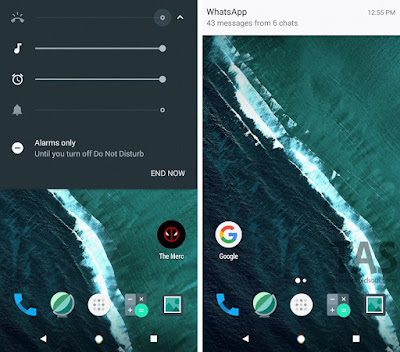
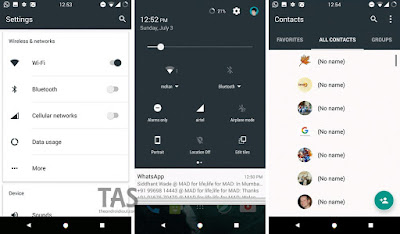
More Screenshots here
To install, know that you need a CM13 custom ROM installed on your device, or any other ROM which supports CM13 theme engine. There are some devices that come with Cyanogen OS pre-loaded, and for such devices, there is no need to hunt for CM13 ROM. Installing CM13 isn’t a straightforward thing as it needs lots of preparation: TWRP recovery and/or root and/or bootloader unlock, etc.
Download CM13 Nougat Theme.
For More Keep Checking Android Custom ROM Fix ™®
That’s all. We hope this guide serves you well. If there’s anything you’d like to be added/changed on this page, PLZ Use the comment box below to contribute more ideas & Suggestions .
Like this post? PLZ Hit the share buttons below to share this article with your friends on Facebook, Google + and Twitter.
Want the latest Updates Sign up for our newsletters!
PLZ Follow Us On Flipboard 4 More Latest Updates.
Best Regards.™
Available link for download
Sunday, November 20, 2016
Final Android 7 0 Nougat developer preview now available
Final Android 7 0 Nougat developer preview now available

iOS beta testers aren’t the only ones getting new software to try out today, as Google has announced a new Android N Developer Preview release.

from PhoneDog.com - Latest videos, reviews, articles, news and posts http://ift.tt/2aaSf8I
via IFTTT
Available link for download
Thursday, November 17, 2016
Google Camera v4 1 from Nougat dev preview 5 has a twist gesture to switch between front and back cameras
Google Camera v4 1 from Nougat dev preview 5 has a twist gesture to switch between front and back cameras

Google Camera v4.1, which has shipped with Android N (Nougat is still a little tough to say) dev preview 5, has been a treasure trove of new features. It introduced UI tweaks and new animations with plenty of little changes, then we also discovered that it has the much requested feature to pause video recording. But now were finding another very hidden option of the camera: a twist gesture.
When youve got your viewfinder up, you can twist your phone away from you and then back on its vertical axis for a couple of times — think twist gesture on Moto devices — and that will switch between the front and back camera.
Read MoreGoogle Camera v4.1 from Nougat dev preview 5 has a twist gesture to switch between front and back cameras was written by the awesome team at Android Police.


from Android Police – Android News, Apps, Games, Phones, Tablets http://ift.tt/2al1vF9
via IFTTT
Available link for download
Thursday, September 29, 2016
Final Developer Preview before Android 7 0 Nougat begins rolling out
Final Developer Preview before Android 7 0 Nougat begins rolling out
Posted by Dave Burke, VP of Engineering

As we close in on the public rollout of Android 7.0 Nougat to devices later this summer, today we’re releasing Developer Preview 5, the last milestone of this preview series. Last month’s Developer Preview included the final APIs for Nougat; this preview gives developers the near-final system updates for all of the supported preview devices, helping you get your app ready for consumers.
Here’s a quick rundown of what’s included in the final Developer Preview of Nougat:
- System images for Nexus and other preview devices
- An emulator that you can use for doing the final testing of your apps to make sure they’re ready
- The final N APIs (API level 24) and latest system behaviors and UI
- The latest bug fixes and optimizations across the system and in preinstalled apps
Working with this latest Developer Preview, you should make sure your app handles all of the system behavior changes in Android N, like Doze on the Go, background optimizations, screen zoom, permissions changes, and more. Plus, you can take advantage of new developer features in Android N such as Multi-window support, Direct Reply and other notifications enhancements, Direct boot, new emojis and more.
Publish your apps to alpha, beta or production channels in Google Play
After testing your apps with Developer Preview 5 you should publish the updates to Google Play soon. We recommend compiling against, and optionally targeting, API 24 and then publishing to your alpha, beta, or production channels in the Google Play Developer Console. A great strategy to do this is using Google Play’s beta testing feature to get early feedback from a small group of users -- including Developer Preview users — and then doing a staged rollout as you release the updated app to all users.
How to get Developer Preview 5
If you are already enrolled in the Android Beta program, your devices will get the Developer Preview 5 update right away, no action is needed on your part. If you aren’t yet enrolled in Android Beta, the easiest way to get started is by visiting android.com/beta and opt-in your eligible Android phone or tablet -- you’ll soon receive this preview update over-the-air. As always, you can also download and flash this update manually. The Nougat Developer Preview is available for Nexus 6, Nexus 5X, Nexus 6P, Nexus 9, and Pixel C devices, as well as General Mobile 4G [Android One] devices.
Thanks so much for all of your feedback so far. Please continue to share feedback or requests either in the N Developer Preview issue tracker, N Preview Developer community, or Android Beta community as we work towards the consumer release later this summer. Android Nougat is almost here!
Also, the Android engineering team will host a Reddit AMA on r/androiddev to answer all your technical questions about the platform tomorrow, July 19 from 12-2 PM (Pacific Time). We look forward to addressing your questions!
Available link for download