Showing posts with label oneplus3. Show all posts
Showing posts with label oneplus3. Show all posts
Tuesday, December 6, 2016
How to Install Android 6 0 1 Marshmallow FreedomOS 1 1 2 OxygenOS 3 2 1 ROM on OnePlus3 A3000
How to Install Android 6 0 1 Marshmallow FreedomOS 1 1 2 OxygenOS 3 2 1 ROM on OnePlus3 A3000
According to XDA Member NevaX1, Android 6.0.1 Marshmallow FreedomOS 1.1.2[ OxygenOS-3.2.1] ROM is available now for OnePlus3 A3000.
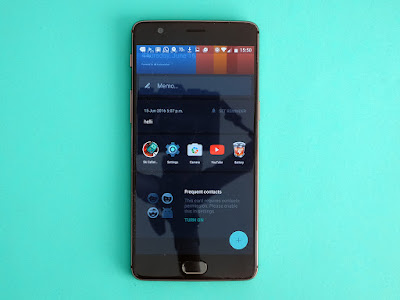
FreedomOS allows you to debloat your ROM smartly.
Everything is customisable, you can install the most minimalistic rom, like a fully modded rom.
So basically, it install the untouched stock rom and install and remove all the functionality you have selected in the aroma.
÷ ROM Features:
•Options / Mods available [ON/OFF] .
•Install/Uninstall Google apps:
Calculator
- Calendar
- Chrome
- Drive
- Gmail
- Gmail Exchange
- Google
- Maps
- Photos
- Play Music
- Play Movies
- YouTube
-Basic Dream
- Bluetooth Midi Service
- Bluetooth Test Mode
- Desk Clock
- EngineeringMode
- EngSpecialTest
- Facelock
- Galaxy
- Holospiral
- Animated wallpaper
- LogKitSdService
- Music
- Noise Feild
- OemAutoTestServer
- OEMLogKit
- Phase Beam
- Protips
- SensorTestTool
- Tags
- WifiRfTestApk ...
÷ Change your DPI :
- 500
- ...
- 350.
÷Extra mod [ON/OFF] :
- SuperSU | systemless 2.74
- Viper4Android + DolbyAtmos | DivineBeats V7.0 Evolution.
Viper4android
Awesome Sound
Sony Walkman
Pon-3 Audio
eXpress Engine
SFORCE SURROUND 3D
48,000 KHz Sampling Rate
Faster Audio Processing
Dolby Digital Plus Libs
Dolby Atmos
Beats Audio Libs
Sony ClearAudio and XLoud libs
SRS Processing
DTS Processing
Noozxoide EIZO-rewire™ PRO
Louder output in headphones and speaker
Bass enchancement
MegaBass
Divine Equalizer
Am3D Zirene Audio Fx
Dolby Digital+
Sound you have never heard before from your device and many more....
- Xposed Installer | Flash the xposed zip yourself after the AROMA
- Adaway + hosts file
- Android Debugging Bridge
- RRO Layer .
FreedomOS allows you to debloat your ROM smartly.
Everything is customisable, you can install the most minimalistic rom, like a fully modded rom.
So basically, it install the untouched stock rom and install and remove all the functionality you have selected in the aroma.
÷ ROM Features:
•Options / Mods available [ON/OFF] .
•Install/Uninstall Google apps:
Calculator
- Calendar
- Chrome
- Drive
- Gmail
- Gmail Exchange
- Maps
- Photos
- Play Music
- Play Movies
- YouTube
-Basic Dream
- Bluetooth Midi Service
- Bluetooth Test Mode
- Desk Clock
- EngineeringMode
- EngSpecialTest
- Facelock
- Galaxy
- Holospiral
- Animated wallpaper
- LogKitSdService
- Music
- Noise Feild
- OemAutoTestServer
- OEMLogKit
- Phase Beam
- Protips
- SensorTestTool
- Tags
- WifiRfTestApk ...
÷ Change your DPI :
- 500
- ...
- 350.
÷Extra mod [ON/OFF] :
- SuperSU | systemless 2.74
- Viper4Android + DolbyAtmos | DivineBeats V7.0 Evolution.
Viper4android
Awesome Sound
Sony Walkman
Pon-3 Audio
eXpress Engine
SFORCE SURROUND 3D
48,000 KHz Sampling Rate
Faster Audio Processing
Dolby Digital Plus Libs
Dolby Atmos
Beats Audio Libs
Sony ClearAudio and XLoud libs
SRS Processing
DTS Processing
Noozxoide EIZO-rewire™ PRO
Louder output in headphones and speaker
Bass enchancement
MegaBass
Divine Equalizer
Am3D Zirene Audio Fx
Dolby Digital+
Sound you have never heard before from your device and many more....
- Xposed Installer | Flash the xposed zip yourself after the AROMA
- Adaway + hosts file
- Android Debugging Bridge
- RRO Layer .
View my Flipboard Magazine.
÷ Prerequisites:
•You need an unlocked bootloader .
•This tutorial is only for installing Android 6.0.1 NucleaRom ROM on OnePlus3 A3000. Please do not try on any other One3 variants.
•Your phone should have a custom recovery installed in order to install this NucleaRom ROM on your phone.
•We will be using TWRP Recovery for this tutorial.
•This tutorial will wipe out all your data. Make sure you backup all your data in your phone before proceeding.
•Perform a Dalvik Cache wipe before proceeding from the Recovery Mode.
*Disclaimer:
Android Custom ROM fix ® provide various Firmware Updates and Rooting process along with Custom ROM,Modes,file are all belong to their owners/developers. The autor of this site or the developers are not responsible, if you damage or brick your device.Do it on your own risk and follow the instruction properly.
* Important:
Backup important files stored on your device before proceeding with the steps below, so that in case something goes wrong you’ll have backup of all your important files.
÷ How to Install Android 6.0.1 Marshmallow FreedomOS 1.1.2 [ OxygenOS-3.2.1] ROM on OnePlus3 A3000.
1- Download Android 6.0.1 Marshmallow FreedomOS 1.1.2[ OxygenOS-3.2.1] and copy the zip file in your OP3
2- Reboot to TWRP
3- Make a nandroid backup (optionnal)
4- Wipe data, system, dalvik, cache
5- Install > Select FreedomOS zip file
6- Your One3 will boot now and it might take about 5 minutes to boot on your first time after flashing a new ROM. So, please wait.
Enjoy aroma installer .

That’s it! Your OnePlus3 should now have Android 6.0.1 Marshmallow FreedomOS 1.1.2 [ OxygenOS-3.2.1] ROM on OnePlus3 A3000. installed on your phone! Go to Settings > About phone to verify.
For More OnePlus3 Updates Keep Checking Android Custom ROM Fix ™®
That’s all. We hope this guide serves you well. If there’s anything you’d like to be added/changed on this page, PLZ Use the comment box below to contribute more ideas & Suggestions .
Like this post? PLZ Hit the share buttons below to share this article with your friends on Facebook, Google + and Twitter.
Want the latest Updates Sign up for our newsletters!
PLZ Follow Us On Flipboard 4 More Latest Updates.
Best Regards.™
÷ Prerequisites:
•You need an unlocked bootloader .
•This tutorial is only for installing Android 6.0.1 NucleaRom ROM on OnePlus3 A3000. Please do not try on any other One3 variants.
•Your phone should have a custom recovery installed in order to install this NucleaRom ROM on your phone.
•We will be using TWRP Recovery for this tutorial.
•This tutorial will wipe out all your data. Make sure you backup all your data in your phone before proceeding.
•Perform a Dalvik Cache wipe before proceeding from the Recovery Mode.
*Disclaimer:
Android Custom ROM fix ® provide various Firmware Updates and Rooting process along with Custom ROM,Modes,file are all belong to their owners/developers. The autor of this site or the developers are not responsible, if you damage or brick your device.Do it on your own risk and follow the instruction properly.
* Important:
Backup important files stored on your device before proceeding with the steps below, so that in case something goes wrong you’ll have backup of all your important files.
÷ How to Install Android 6.0.1 Marshmallow FreedomOS 1.1.2 [ OxygenOS-3.2.1] ROM on OnePlus3 A3000.
1- Download Android 6.0.1 Marshmallow FreedomOS 1.1.2[ OxygenOS-3.2.1] and copy the zip file in your OP3
2- Reboot to TWRP
3- Make a nandroid backup (optionnal)
4- Wipe data, system, dalvik, cache
5- Install > Select FreedomOS zip file
6- Your One3 will boot now and it might take about 5 minutes to boot on your first time after flashing a new ROM. So, please wait.
Enjoy aroma installer .
That’s it! Your OnePlus3 should now have Android 6.0.1 Marshmallow FreedomOS 1.1.2 [ OxygenOS-3.2.1] ROM on OnePlus3 A3000. installed on your phone! Go to Settings > About phone to verify.
For More OnePlus3 Updates Keep Checking Android Custom ROM Fix ™®
That’s all. We hope this guide serves you well. If there’s anything you’d like to be added/changed on this page, PLZ Use the comment box below to contribute more ideas & Suggestions .
Like this post? PLZ Hit the share buttons below to share this article with your friends on Facebook, Google + and Twitter.
Want the latest Updates Sign up for our newsletters!
PLZ Follow Us On Flipboard 4 More Latest Updates.
Best Regards.™
Available link for download

Friday, November 4, 2016
How to Update OnePlus3 to Android 6 0 1 Marshmallow XOSP 6 3 ROM Xperia Z5 Features
How to Update OnePlus3 to Android 6 0 1 Marshmallow XOSP 6 3 ROM Xperia Z5 Features
According to XDA member jithumon, Android 6.0.1 Marshmallow XOSP 6.3 ( Xperia Open Source Project) ROM is now Released for One Plus 3.

÷ ROM Features:
Based on CM 13.0
Removed many unnecessary apps and stuff as well as CM ones
StatusBar Clock font style
StatusBar Clock font size
Added StatusBar Date & style options
Added option for date style/position, left-right of clock
Xperia Z5 inspired LockScreen style
Xperia Fonts
Xperia Battery Text prototype
Time Contextual Headers
XOSP Universal dialog for Shutdown/Reboot and Dexopting Process
XOSPOTA
Stock Kernel
Snap Camera
ViPER Audio Engine
Theme Chooser
Xperia based Bootanimation
Custom Framework and SystemUI Xperia drawables
XOSPFileManager
Xperia Z5 sounds
Xperia X Wallpapers
XOSPSetupWizard
Custom Materialized
Stock Browser is custom themed
Contacts is custom themed (Much more Xperia Style)
Dialer is custom themed (Much more Xperia Style)
Status bar logo
Navigation Bar ON/OFF
NavBar dimensions
SlimDim
HW Keys ON/OFF
SlimSeek Bar
Status bar Network Traffic indicator
RAM Bar in recents options
Toast Animations
Long Press back to kill in Development Settings
Ability to hide the Super SU status bar icon
Dashboard Columns
Dashboard double lines toggle
Double Tap to sleep anywhere on the lockscreen
On-the-go Mode
Double tap to sleep on navigation bar
SystemApp remover
Omni inbuilt SystemUI Screen recording
SuperSU
Xperia Apps
Xperia Z5 Home app
Album App
PhotoEditor
PhotoAnalyzer
Xperia Keyboard (aka textinput-tng)
Music (former WALKMAN)
Video
SemCalendar
AudioRecorder (Material Version)
ClockWidgets
Sketch
SmartConnect
WallpaperPicker (For Xperia X custom wallpapers)
Weather App
Wheater Widget
Walkman Widget
Track ID
SomcPodcast
SemcDLNA...
View my Flipboard Magazine.
÷ Prerequisites:
•Your phone should have a custom recovery installed in order to install this NanoROM ROM on your phone.
•We will be using TWRP Recovery for this tutorial.
•This tutorial will wipe out all your data. Make sure you backup all your data in your phone before proceeding.
•Perform a Dalvik Cache wipe before proceeding from the Recovery Mode.
*Disclaimer:
Android Custom ROM fix ® provide various Firmware Updates and Rooting process along with Custom ROM,Modes,file are all belong to their owners/developers. The autor of this site or the developers are not responsible, if you damage or brick your device.Do it on your own risk and follow the instruction properly.
* Important:
Backup important files stored on your device before proceeding with the steps below, so that in case something goes wrong you’ll have backup of all your important files.
You can find out how to apply it right now via XDA.

For More One Plus 3 Updates Keep Checking Android custom ROM Fix ™®
That’s all. We hope this guide serves you well. If there’s anything you’d like to be added/changed on this page, PLZ Use the comment box below to contribute more ideas & Suggestions .
Like this post? PLZ Hit the share buttons below to share this article with your friends on Facebook, Google + and Twitter.
Want the latest Updates Sign up for our newsletters!
PLZ Follow Us On Flipboard 4 More Latest Updates.
Best Regards.™
÷ Prerequisites:
•Your phone should have a custom recovery installed in order to install this NanoROM ROM on your phone.
•We will be using TWRP Recovery for this tutorial.
•This tutorial will wipe out all your data. Make sure you backup all your data in your phone before proceeding.
•Perform a Dalvik Cache wipe before proceeding from the Recovery Mode.
*Disclaimer:
Android Custom ROM fix ® provide various Firmware Updates and Rooting process along with Custom ROM,Modes,file are all belong to their owners/developers. The autor of this site or the developers are not responsible, if you damage or brick your device.Do it on your own risk and follow the instruction properly.
* Important:
Backup important files stored on your device before proceeding with the steps below, so that in case something goes wrong you’ll have backup of all your important files.
You can find out how to apply it right now via XDA.
For More One Plus 3 Updates Keep Checking Android custom ROM Fix ™®
That’s all. We hope this guide serves you well. If there’s anything you’d like to be added/changed on this page, PLZ Use the comment box below to contribute more ideas & Suggestions .
Like this post? PLZ Hit the share buttons below to share this article with your friends on Facebook, Google + and Twitter.
Want the latest Updates Sign up for our newsletters!
PLZ Follow Us On Flipboard 4 More Latest Updates.
Best Regards.™
Available link for download
Subscribe to:
Posts (Atom)