Showing posts with label internet. Show all posts
Showing posts with label internet. Show all posts
Friday, January 27, 2017
Augmenter Débit Connexion Internet Modem Huawei
Augmenter Débit Connexion Internet Modem Huawei
Avoir une vitesse de connexion optimale est importante pour surfer sur internet cela influence sur le chargement des pages mais aussi le téléchargement de données. Pour connaitre la vitesse de connexion de votre appareil, cliquez ici.
Un modem est un équipement sans fil avec une carte SIM intégrée, lappareil supporte tous les réseaux 2G/3G/4G du monde et la fréquence de fonctionnement varie selon le type de réseau utilisé: EDGE, GPRS, GSM, UMTS, DC-HSPA+, HSPA+ et LTE.
Si vous avez un modem Huawei avec une vitesse réduite, plusieurs facteurs peuvent expliquer ces problèmes de lenteur. La première chose à vérifier est la couverture réseau, la stabilité du signal est indiquée par le nombre de barre.
Assurez-vous davoir configuré votre gestionnaire de connexion avec les bons paramètres de votre opérateur, une erreur de configuration peut avoir un impact sur la puissance démission. Si vous utilisez un logiciel de connexion comme Mobile Partner, il est important que loption "GSM Only" soit sélectionnée dans les paramètres réseau pour avoir partout et à tout moment le service 3G.
Il existe une solution logicielle pour augmenter la vitesse de téléchargement de votre modem. Huawei Modem Unlocker v5.8.1 by Bojs est un logiciel de déblocage pour modem Huawei, Vodafone et Sierra Wireless. Lutilitaire permet daugmenter le débit de téléchargement à condition que votre modem supporte cette fonctionnalité.

Connectez le modem à linterface du port USB de lordinateur. Exécutez Huawei Modem Unlocker v5.8.1 by Bojs, cliquez sur MDM UPGRADE UTILITY ensuite choisissez loption désirée.
Available link for download

Wednesday, January 4, 2017
Google OnHub Smart Router for Internet of Things
Google OnHub Smart Router for Internet of Things
Google is all about the Web: it develops the most popular browser and mobile operating system, it has a public DNS service, it provides broadband Internet (Google Fiber) and wireless service (Project Fi). So why not build a router to improve your Internet connection and make your router as smart and easy to use as your smartphone?
Google partnered with TP-LINK to build OnHub (TGR1900), a next-generation router for the Internet of Things. Its not the fastest router (AC 1900 Mbps), its not the most expensive router ($199.99) and its not the best router for power users. Instead, Google focused on providing the best experience for regular users, much like Apple and its AirPort devices.

"We replaced unruly cords and blinking lights with internal antennas and subtle, useful lighting, so youll be happy placing OnHub out in the open, where your router performs its best. A unique antenna design and smart software keep working in the background, automatically adjusting OnHub to avoid interference and keep your network at peak performance. You can even prioritize a device, so that your most important activity — like streaming your favorite show — gets the fastest speed," mentions Google.
There are mobile apps for Android and iOS which let you setup the router, change the settings and check the stats. A Google account is required and Google saves all the settings online, except for the WiFi password. Googles OnHub downloads and installs new versions of the firmware automatically and the best thing is that the router doesnt restart, so it doesnt interrupt your connection
OnHub is designed for Internet of Things and it supports Bluetooth Smart Ready, Weave (Nest protocol for the Internet of Things), IEEE 802.15.4 (a standard that focuses on low-speed connections between devices). The router has a dual-core 1.4GHz processor from Qualcomm Atheros (its based on Snapdragon S4), 4GB of storage, 1GB of RAM, one USB 3.0 port, a 3W speaker, a WAN port and a single LAN port (both are Gigabit ports). Youll need a switch if you want more Ethernet ports.
You can pre-order OnHub from Google Store, Amazon and other sites in the US and it will ship in the coming weeks. It will also be available for sale in retail stores in the U.S. and in Canada. Google plans to release a second OnHub device later this year, in partnership with ASUS.
Many people will wonder if Google monitors the sites theyre visiting. Theres a help center article about this, which mentions that Google collects some data about your Internet usage (data speeds, historical network usage, network status, connected devices, network settings) and associates some of them with your Google account, but you can disable this in the settings. Google DNS is used by default, but you can change the DNS settings.
So why isnt OnHub a router for power users? It has a single WAN port, it uses mobile apps for setup and changing settings, its complicated to connect multiple OnHubs because OnHub has a fixed subnet IP address that currently cant be changed.
Available link for download
Sunday, December 18, 2016
MrLooquer IPv6 Un buscador de servicios sobre IPv6 en Internet para pentesters hackers y analistas de seguridad
MrLooquer IPv6 Un buscador de servicios sobre IPv6 en Internet para pentesters hackers y analistas de seguridad
Una de las cosas que cualquier aficionado a las redes de computadores conoce es el amplio espacio de direccionamiento disponible en IPv6, concretamente 128 bits. Puede que a alguien le parezca un número pequeño, pero esos bits dan para mucho, tanto, que el IETF, uno de los organismos reguladores de Internet, reconoce que los métodos basados en “fuerza bruta” utilizados en escaneos de reconocimiento en IPv4, no sirven en redes IPv6. Cuando un consultor de seguridad quiere saber qué equipos hay en una determinada subred con direccionamiento IPv4 suele hacer algo como: nmap 192.168.1.0/24
El comando anterior lanzará diversas pruebas sobre cada una de las direcciones IP que existen dentro de esa subred. En este caso, al ser un /24 significa que hay 8 bits destinados a dar direcciones de host, es decir, 2^8=254 direcciones IP. En este tipo de escaneos se aplica el concepto de fuerza bruta, o lo que es lo mismo, probar todas las 254 opciones posibles. Una red IPv6, sin embargo, tiene habitualmente un /64 al final, y eso significa que hay 2^64 direcciones posibles dentro de esa subred, es decir 18.446.744.073.709.551.616, lo que resulta totalmente inviable de escanear. Y no olvidemos de que se trata de una sola red.
El resultado es que mucha gente piensa que usar una dirección IPv6 implica que ésta no podrá ser descubierta por un bot-escáner situado en Internet, lo cual nos lleva al peligroso concepto de seguridad por ocultación. Incluso hay gente que dice que esa supuesta oscuridad que ofrece IPv6 ofrece “a lot of security”.
Pero esto no es del todo cierto. El pasado tres de marzo se presentó oficialmente en la séptima edición de la conferencia RootedCON el servicio online MrLooquer, que recopila y procesa millones y millones de servicios abiertos en máquinas conectadas a Internet en IPv6. El portal web que ofrece MrLooquer, que también es accesible por API, permite recorrer y visualizar millones de puertos y banners de servicios conectados a IPv6, permitiendo a un analista hacer cosas similares a las que está habituado al hacking con buscadores tipo Shodan, pero centrado en el protocolo IPv6.
También permite realizar búsquedas más específicas sobre la infraestructura Big Data que lo soporta para afinar los resultados. Algunos ejemplos de búsquedas::
? Servidores de correo electrónico “Dovecot” escuchando en IPv6: Algunos piensan que todavía no hay muchos servidores de correo conectados a redes IPv6, y esto puede llegar a ser un problema para los mecanismos antispam existentes basados en listas negras. Un usuario con IPv6 podría enviar correos electrónicos utilizando como origen cada una de las 2^64 direcciones IPv6 disponibles. No olvidemos que un usuario residencial con salida a Internet por IPv6 suele tener asignado un /64 como el que hemos visto anteriormente, es decir, tiene 18.446.744.073.709.551.616 direcciones IPv6 públicas para a utilizar a su voluntad. Por tanto, los mecanismos actuales de control basados en listas negras IP no pueden funcionar de la misma forma con IPv6, y necesitan ser revisados para, por ejemplo, filtrar por rangos /64, con las implicaciones que esto conlleva.
? Busqueda de servidores DNS: Podemos encontrar fácilmente servidores DNS escuchando en IPv6 con el filtro “port:53” (para usar este tipo de filtros es necesario registro, también gratuito). Observando los resultados de la búsqueda podemos preguntarnos si estos servidores podrían ser utilizados para lanzar ataques de denegación de servicio amplificados, y si los mecanismos de protección actuales contra este tipo de ataques están preparados para manejar ataques lanzados desde redes IPv6.
? Busqueda de servidores DNS vulnerables: MrLooquer también permite conocer el grado de exposición de servicios afectados por una determinada vulnerabilidad escuchando en IPv6. Por ejemplo, en el caso de servidores DNS, podríamos realizar una búsqueda más dirigida para obtener equipos potencialmente afectados por la vulnerabilidad publicada recientemente relativa al servidor de nombres DNS Bind9 (CVE-2016-2088). Se trata de una vulnerabilidad que permite causar una denegación de servicio (DoS) mediante el envío remoto de un paquete malformado usando DNS Cookies.
Mediante un sencilla búsqueda en MrLooquer podemos obtener un listado de servicios potencialmente afectados por esta vulnerabilidad escuchando en IPv6. De nuevo, nos surge la pregunta de si las políticas de seguridad usadas actualmente para proteger los sistemas de este tipo de ataques en IPv4 se están actualizando para redes IPv6:
? Búsqueda de servicios: También podemos encontrar servicios tecnológicamente más actuales tales como gestores de colas RabbitMQ buscando el puerto 6379. Precisamente Daniel García presentó también en la última edición de RootedCon un ataque de inyección de comandos sobre este tipo de servicios cuando están mal configurados.
? Relación de direcciones IPv4&IPv6: MrLooquer también ofrece una característica muy interesante para cualquier analista de seguridad, que es la capacidad de relacionar entidades IPv6 con direcciones IPv4 y dominios. Esto hace posible descubrir cómo las organizaciones están adoptando IPv6 y cómo en algunos casos las políticas de seguridad no están siendo aplicadas de igual forma para servicios escuchando en cada uno de los protocolos. Esto puede suponer un riesgo elevado y debe ser considerado muy cuidadosamente, ya que como podemos ver, IPv6 no ofrece oscuridad y puede acabar siendo un punto de exposición a ataques.
IPv6 Hoy en día
Por otro lado, respecto la pregunta de cuándo llegará IPv6 a nuestro país, ¿alguien tiene la sensación de que IPv6 no termina de llegar nunca? No sois los únicos, mucha gente lo piensa, pero eso tampoco es del todo cierto. Tenemos direcciones IPv6 mucho más cerca de lo que nos pensamos y ya hay que prepararse para ello. En esta charla de nuestro compañero Rafael Sánchez puedes ver cómo montarte tu propia infraestructura para comenzar en el mundo de la seguridad IPv6.
Figura 10: Montarse un escenario de hacking IPv6 por 2 €
Muchas empresas que quieren tener presencia en Internet se apoyan en infraestructuras provisionadas por proveedores de servidores virtuales o VPS. Muchos de estos proveedores, entre ellos los más importantes (Amazon, Digital Ocean o Google Cloud), ofrecen a sus clientes conectividad IPv6 por defecto. Si además tenemos en cuenta que muchos servicios en sistemas Linux se levantan por defecto tanto en IPv4 como en IPv6 (SSH, por ejemplo), obtenemos que cualquier empresa que contrate estos servicios levantará puertos y servicios en redes IPv6, incluso sin ser consciente de ello. De esta forma, podemos ver que efectivamente muchas empresas españolas ya cuentan con servicios escuchando en IPv6.
MrLooquer surge con la finalidad de ser una herramienta útil para los expertos en seguridad en redes enfocada a IPv6, pero no solo eso, también tiene el objetivo de ayudar a entender las relaciones existentes entre entidades tales como: Dominio-IPv4-IPv6-Puerto. Si quieres más información sobre seguridad y hacking IPv6, tienes los siguientes artículos:
Autores: Fran & Rafa, equipo de https://mrlooquer.com (@mrlooquer)
 |
| Figura 1: MrLooquer. Un buscador de servicios sobre IPv6 en Internet |
El comando anterior lanzará diversas pruebas sobre cada una de las direcciones IP que existen dentro de esa subred. En este caso, al ser un /24 significa que hay 8 bits destinados a dar direcciones de host, es decir, 2^8=254 direcciones IP. En este tipo de escaneos se aplica el concepto de fuerza bruta, o lo que es lo mismo, probar todas las 254 opciones posibles. Una red IPv6, sin embargo, tiene habitualmente un /64 al final, y eso significa que hay 2^64 direcciones posibles dentro de esa subred, es decir 18.446.744.073.709.551.616, lo que resulta totalmente inviable de escanear. Y no olvidemos de que se trata de una sola red.
 |
| Figura 2: Documento de IETF con información sobre escaneos en IPv6 |
El resultado es que mucha gente piensa que usar una dirección IPv6 implica que ésta no podrá ser descubierta por un bot-escáner situado en Internet, lo cual nos lleva al peligroso concepto de seguridad por ocultación. Incluso hay gente que dice que esa supuesta oscuridad que ofrece IPv6 ofrece “a lot of security”.
 |
| Figura 3: Opinión sobre las defensas NO necesarias en IPv6 |
Pero esto no es del todo cierto. El pasado tres de marzo se presentó oficialmente en la séptima edición de la conferencia RootedCON el servicio online MrLooquer, que recopila y procesa millones y millones de servicios abiertos en máquinas conectadas a Internet en IPv6. El portal web que ofrece MrLooquer, que también es accesible por API, permite recorrer y visualizar millones de puertos y banners de servicios conectados a IPv6, permitiendo a un analista hacer cosas similares a las que está habituado al hacking con buscadores tipo Shodan, pero centrado en el protocolo IPv6.
 |
| Figura 4: Servicio online MrLooquer |
También permite realizar búsquedas más específicas sobre la infraestructura Big Data que lo soporta para afinar los resultados. Algunos ejemplos de búsquedas::
? Servidores de correo electrónico “Dovecot” escuchando en IPv6: Algunos piensan que todavía no hay muchos servidores de correo conectados a redes IPv6, y esto puede llegar a ser un problema para los mecanismos antispam existentes basados en listas negras. Un usuario con IPv6 podría enviar correos electrónicos utilizando como origen cada una de las 2^64 direcciones IPv6 disponibles. No olvidemos que un usuario residencial con salida a Internet por IPv6 suele tener asignado un /64 como el que hemos visto anteriormente, es decir, tiene 18.446.744.073.709.551.616 direcciones IPv6 públicas para a utilizar a su voluntad. Por tanto, los mecanismos actuales de control basados en listas negras IP no pueden funcionar de la misma forma con IPv6, y necesitan ser revisados para, por ejemplo, filtrar por rangos /64, con las implicaciones que esto conlleva.
 |
| Figura 5: Lista de servidores Dovecot escuchando sobre IPv6 |
? Busqueda de servidores DNS: Podemos encontrar fácilmente servidores DNS escuchando en IPv6 con el filtro “port:53” (para usar este tipo de filtros es necesario registro, también gratuito). Observando los resultados de la búsqueda podemos preguntarnos si estos servidores podrían ser utilizados para lanzar ataques de denegación de servicio amplificados, y si los mecanismos de protección actuales contra este tipo de ataques están preparados para manejar ataques lanzados desde redes IPv6.
 |
| Figura 6: Servidores DNS sobre IPv6 |
? Busqueda de servidores DNS vulnerables: MrLooquer también permite conocer el grado de exposición de servicios afectados por una determinada vulnerabilidad escuchando en IPv6. Por ejemplo, en el caso de servidores DNS, podríamos realizar una búsqueda más dirigida para obtener equipos potencialmente afectados por la vulnerabilidad publicada recientemente relativa al servidor de nombres DNS Bind9 (CVE-2016-2088). Se trata de una vulnerabilidad que permite causar una denegación de servicio (DoS) mediante el envío remoto de un paquete malformado usando DNS Cookies.
 |
| Figura 7: Bug de DoS en servidores DNS |
Mediante un sencilla búsqueda en MrLooquer podemos obtener un listado de servicios potencialmente afectados por esta vulnerabilidad escuchando en IPv6. De nuevo, nos surge la pregunta de si las políticas de seguridad usadas actualmente para proteger los sistemas de este tipo de ataques en IPv4 se están actualizando para redes IPv6:
 |
| Figura 8: Servidores DNS potencialmente vulnerables |
? Búsqueda de servicios: También podemos encontrar servicios tecnológicamente más actuales tales como gestores de colas RabbitMQ buscando el puerto 6379. Precisamente Daniel García presentó también en la última edición de RootedCon un ataque de inyección de comandos sobre este tipo de servicios cuando están mal configurados.
 |
| Figura 9: Servidores RabbitMQ sobre IPv6 |
? Relación de direcciones IPv4&IPv6: MrLooquer también ofrece una característica muy interesante para cualquier analista de seguridad, que es la capacidad de relacionar entidades IPv6 con direcciones IPv4 y dominios. Esto hace posible descubrir cómo las organizaciones están adoptando IPv6 y cómo en algunos casos las políticas de seguridad no están siendo aplicadas de igual forma para servicios escuchando en cada uno de los protocolos. Esto puede suponer un riesgo elevado y debe ser considerado muy cuidadosamente, ya que como podemos ver, IPv6 no ofrece oscuridad y puede acabar siendo un punto de exposición a ataques.
 |
| Figura 10: Relación de servicios y direcciones IPv4 & IPv6 |
Por otro lado, respecto la pregunta de cuándo llegará IPv6 a nuestro país, ¿alguien tiene la sensación de que IPv6 no termina de llegar nunca? No sois los únicos, mucha gente lo piensa, pero eso tampoco es del todo cierto. Tenemos direcciones IPv6 mucho más cerca de lo que nos pensamos y ya hay que prepararse para ello. En esta charla de nuestro compañero Rafael Sánchez puedes ver cómo montarte tu propia infraestructura para comenzar en el mundo de la seguridad IPv6.
Figura 10: Montarse un escenario de hacking IPv6 por 2 €
Muchas empresas que quieren tener presencia en Internet se apoyan en infraestructuras provisionadas por proveedores de servidores virtuales o VPS. Muchos de estos proveedores, entre ellos los más importantes (Amazon, Digital Ocean o Google Cloud), ofrecen a sus clientes conectividad IPv6 por defecto. Si además tenemos en cuenta que muchos servicios en sistemas Linux se levantan por defecto tanto en IPv4 como en IPv6 (SSH, por ejemplo), obtenemos que cualquier empresa que contrate estos servicios levantará puertos y servicios en redes IPv6, incluso sin ser consciente de ello. De esta forma, podemos ver que efectivamente muchas empresas españolas ya cuentan con servicios escuchando en IPv6.
 |
| Figura 11: Empresas españolas con IPv6 |
MrLooquer surge con la finalidad de ser una herramienta útil para los expertos en seguridad en redes enfocada a IPv6, pero no solo eso, también tiene el objetivo de ayudar a entender las relaciones existentes entre entidades tales como: Dominio-IPv4-IPv6-Puerto. Si quieres más información sobre seguridad y hacking IPv6, tienes los siguientes artículos:
- Hacking en redes de datos IPv6: Conceptos básicos IPv6 (1)En el futuro, MrLooquer evolucionará en este sentido utilizando tecnologías de visualización de relaciones mediante grafos y métodos de análisis avanzados para ofrecer a los usuarios la posibilidad de descubrir el grado de exposición de las organizaciones en el complejo panorama de Internet.
- Hacking en redes de datos IPv6: Conceptos básicos IPv6 (2)
- Hacking en redes de datos IPv6: Hackeado en IPv6 por creer que no lo usas
- Hacking en redes de datos IPv6: Ataque de Neighbor Spoofing
- Hacking en redes de datos IPv6: Captura de SMB con Neighbor Spoofing
- Hacking en redes de datos IPv6: FC00::1 (Algunos) Ataques en redes IPv6
- Hacking en redes de datos IPv6: Man in the middle en redes IPv4 usando IPv6
- Hacking en redes de datos IPv6: Desactivar IPv6 para evitar D.O.S. SLAAC
- Hacking en redes de datos IPv6: Predecir direcciones IPv6 Local-Link de OS X
- Hacking en redes de datos IPv6: Ataques en redes de datos IPv4 e IPv6
- Hacking en redes de datos IPv6: Evil FOCA: Ataque SLAAC
- Hacking en redes de datos IPv6: Evil FOCA: Bridging HTTP(IPv6)-HTTPs(IPv4)
- Hacking en redes de datos IPv6: Pasar de IPv4 a IPv6 con una respuesta DNS
- Hacking en redes de datos IPv6: Cómo activar IPv6 en Google Chrome
- Hacking en redes de datos IPv4: Ataque DHCP ACK Injector
- Evil FOCA liberada bajo licencia Open Source
- Hacking en redes de datos IPv6: Topera - Scanner de puertos sobre IPv6
- Implementación de Iddle Port Scanning con IPv6
- Detección de IPv6 en Internet: Cada vez hay más sitios
- Detección de Happy Eyeballs en la red
- Ataque ICMPv6 Redirect: man in the middle a Android, OS X & iPhone
- Implementación de ataques "Delorean" a HSTS
Autores: Fran & Rafa, equipo de https://mrlooquer.com (@mrlooquer)
Sigue Un informático en el lado del mal - Google+ RSS 0xWord

Available link for download
Tuesday, September 13, 2016
Comment Partager la Connexion Internet des Modems Huawei
Comment Partager la Connexion Internet des Modems Huawei
Partager la connexion internet de votre clé USB 3G/4G Huawei est facile grâce au tableau de bord Mobile Partner v.23.009.09.02.910. Ce gestionnaire de connexion est compatible avec tous les systèmes dexploitation Microsoft, Linux et Mac.

Contrairement aux versions antérieures, la fonctionnalité WiFi Hotspot est ajoutée dans la version Mobile Partner 23.009.09.02.910.
Soft Wi-Fi Hotspot permet de créer gratuitement un réseau sans fil avec nimporte quel modem Huawei, lapplication requière un ordinateur avec une carte wi-fi interne ou externe mais également un système dexploitation:
? Windows XP SP3
? Windows Vista SP2
? Windows Seven SP1 ou version supérieure
Vous devez créer un profil (APN) dans Mobile Partner et pour plus de détails sur la procédure de configuration, consultez larticle consacré. ICI
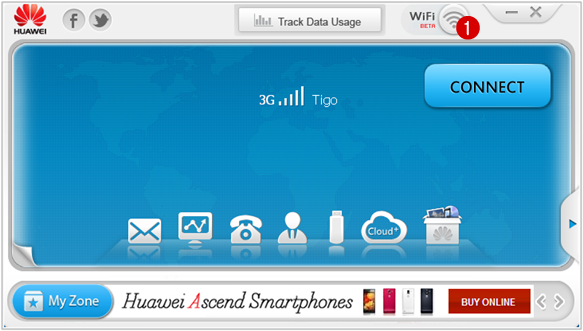
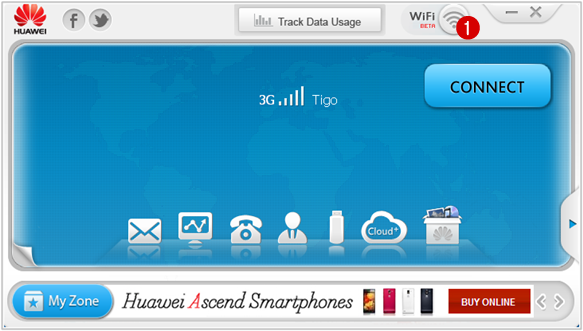
Pour partager votre connexion internet, cliquez sur l’icône Wi-Fi (1) du tableau de bord Mobile Partner.

Vous pouvez protéger votre connexion WiFi (802.11 b/g) avec une clé sécurité WPA2-PSK, entrez un mot de passe (2) de 8 à 63 caractères. Pour activer le service WiFi Hotspot de votre réseau sans fil, cliquez sur Start (1).
Assurez-vous de disposer une connexion internet haut-débit pour permettre à vos amis, collègues et voisins de profiter une qualité de connexion optimale.
 | Bleu indique connexion wifi activée. Gris signifie que vous êtes hors connexion |  |
Vous pouvez connecter jusqu’à 5 périphériques en wi-fi cependant lutilitaire naccepte pas les téléphones mobiles de type androïde comme les appareils: Blackberry, Amazon, Kindles, etc.

Pour limiter le nombre dappareils à se connecter, cliquez sur Settings > Settings Preferences > Wi-Fi Hotspot (4). Sélectionnez le nombre désiré (5), puis cliquez sur OK(6).
Download Link
Modem Unlockdownload mobile partner 23.001.07.22.910, telecharger wifi mobile partner, wifi mobile partner download, mobile partner huawei a wifi, Wi fi in mobile partner, descargar mobile partner wifi software, wifi mobile partner download free, mobile partner latest wifi, huawei mobile program, mobile partner windows 7, mobile partner update, download latest version Huawei mobile partner
Available link for download
Monday, August 29, 2016
How to Share Internet Connection Mobile Partner WiFi Hotspot
How to Share Internet Connection Mobile Partner WiFi Hotspot
Huawei Technologies Co., Ltd .. sells routers 3G / 4G mobile high performance, these WiFi Hotspot offer many advantages in terms of connection speed and their use is ideal when moving. You can share your Internet connection with multiple devices equipped with Wi-Fi device (iPad, iPhone, iTouch, Playstation III, tablet, smartphone, Xbox 360).



Wireless Device
Available link for download
Friday, August 19, 2016
Free Download IDM Internet Download Manager v1 0 For Android Apk App
Free Download IDM Internet Download Manager v1 0 For Android Apk App
IDM -Internet Download Manager v1.0 Apk App
 IDM - Internet Download Manager in your Android.
Download your files with faster speeds. Simply Long Press on a link on your browser and choose "Share Link", click "IDM" and start the download!
This application can split maximum of 32 parts!
*Note:
- You need 2x(file size) the space on your storage to download a file in this very first version.
- For some server, the maximum connections is limited. So, if you continuous get ERROR,
please set lower maximum parts in Setting to download file from that server.Download link
2shared
zippyshare
File size:0.22Mb
Available link for download
Thursday, August 18, 2016
Do you Know how to Make Money Online Through Internet Marketing
Do you Know how to Make Money Online Through Internet Marketing
Approximately 2 billion people in the world consistently use the Internet, and that number continues to grow. For many, the Internet is an indispensable part of everyday life, whether its finding information or connecting with friends or networking with associates. When you think of the boundless possibilities, learning how to make money online through Internet marketing makes a lot of sense.
Steps
1.Determine your abilities and knowledge.
Most importantly, what do you enjoy doing, and is earning money online a possibility?
Sure, starting from scratch is a possibility, but you may be making money online through Internet advertising sooner if you know your product.
The work can feel less like work when you enjoy what youre doing.
Additionally, when you adore what youre doing, youre better equipped to impart your energy through web promoting.
2.Market online through a well designed website.
Todays sites depends on search engine optimization (SEO) for high rankings in web search engines.
For example, if someone searches "beaded earrings" on Google, they will begin at the top of the list and work their way down.
3.Use social networking sites to market online.
Social networking sites can send a lot of traffic to your website.
Join and contribute to discussions that relate to your item.
Social networking can also boost your rankings on web search engines if your item or business appears often enough.
Social networking sites such as Reddit and Digg depend on sharing content that is voted on by users.
Utilize your website URL in your signature.
4.Ask website visitors to take action.
You cant stop online advertising once a visitor clicks to your site. You must make information and ordering information easy to find.
Tell visitors what you want to do.
5.Take care of your customers.
Good customer relations is your greatest marketing tool because it translates into free word-of-mouth (or word-of-keyboard) advertising.
 |
| make money by marketing online |
Steps
1.Determine your abilities and knowledge.
Most importantly, what do you enjoy doing, and is earning money online a possibility?
Sure, starting from scratch is a possibility, but you may be making money online through Internet advertising sooner if you know your product.
The work can feel less like work when you enjoy what youre doing.
Additionally, when you adore what youre doing, youre better equipped to impart your energy through web promoting.
2.Market online through a well designed website.
Todays sites depends on search engine optimization (SEO) for high rankings in web search engines.
For example, if someone searches "beaded earrings" on Google, they will begin at the top of the list and work their way down.
3.Use social networking sites to market online.
Social networking sites can send a lot of traffic to your website.
Join and contribute to discussions that relate to your item.
Social networking can also boost your rankings on web search engines if your item or business appears often enough.
Social networking sites such as Reddit and Digg depend on sharing content that is voted on by users.
Utilize your website URL in your signature.
4.Ask website visitors to take action.
You cant stop online advertising once a visitor clicks to your site. You must make information and ordering information easy to find.
Tell visitors what you want to do.
5.Take care of your customers.
Good customer relations is your greatest marketing tool because it translates into free word-of-mouth (or word-of-keyboard) advertising.
- Respond promptly to orders, questions, and problems.
- Money making is impossible without satisfied customers.
6.Keep your website upto dated and relevant.
You lose credibility if your web site hasnt been updated in a while. No one is going to take a web site seriously that talked about a past event or that refers to after-Christmas sales in June.
Available link for download
Subscribe to:
Posts (Atom)