Showing posts with label wifi. Show all posts
Showing posts with label wifi. Show all posts
Saturday, February 4, 2017
Intercepter NG Auditar la red WiFi desde tu Android
Intercepter NG Auditar la red WiFi desde tu Android
Intercepter-NG es una herramienta para Android que nos permite capturar el tráfico de una red local a la que estemos conectados por medio de ataques de tipo ARP poisoning. Podemos encontrarlo directamente en Google Play Store, pero para que funcione en nuestro dispositivo tendremos que tenerlo rooteado. Su principal utilidad es para hacer auditorías de seguridad de caja negra sin ser descubiertos, desde redes WiFi inseguras a las que se tenga acceso en la empresa de manera similar a como se pueden hacer como DSploit.
Tras descargar la aplicación y darle permisos root podremos comenzar a explotar todo su potencial. Al ejecutar el programa accederemos al menú principal, en el que se nos indicará la interfaz de red en la que estamos trabajando, la red WiFi a la que estamos conectados, la dirección IP de nuestro dispositivo Android y nuestro Gateway.
En la parte superior encontraremos un icono con forma de radar, el cual pulsaremos para comenzar a explorar la red. A continuación se nos mostrara en pantalla los dispositivos que estén conectados indicándonos su sistema operativo mediante técnicas de fingerprinting pasivo - similares a las de Satori -. Una vez seleccionados los objetivos nos aparecerá un menú en la parte superior de la pantalla, en el que encontraremos las distintas herramientas que podremos usar.
En la esquina superior derecha encontraremos un icono una con rueda dentada, sobre el que pulsaremos para establecer la configuración que usaremos para realizar nuestro ataque, aquí será donde podemos activar ataques como SSLStrip para atacar las conexiones HTTPs y otras funciones como el bloqueo de la pantalla para evitar que se nos apague el terminal mientras se ejecuta la aplicación.
La primera pestaña - con el icono radiactivo - nos permitirá comenzar un ataque de ARP Poisoning con el que se realizará el man in the middle y permitirá capturar el tráfico de red. Esta herramienta es la parte más importante de Interceptor-NG, ya que es necesaria para el funcionamiento del resto de opciones. Una vez pulsado el botón “Play” cada vez que la víctima visite una página esta quedara registrada. Si el protocolo de la página es HTTP y la víctima se conecta con sus credenciales, automáticamente nos aparecerá su usuario y contraseña en la pantalla al estilo del clásico Cain & Abel. Sin embargo si el protocolo es HTTPs no nos permitirá hacer esto, excepto en algunos casos que seremos capaces de burlar la capa SSL por medio de los ataques SSLStrip si no hay un Certificate Pinning configurado de forma robusta.
A la derecha encontramos otra pestaña cuyo icono es similar al de Wireshark pero de color verde. Esta herramienta nos será útil para capturar todos los paquetes que viajen por la red y realizar un análisis más exhaustivo de ellos, ya que es un snifer de tráfico general.
En la tercera pestaña - icono con forma de galleta - podremos encontrar las cookies que posteriormente podremos utilizar para secuestrar sesiones - hijacking -. Será tan sencillo como pulsar sobre la cookie que queramos utilizar e iniciaremos la sesión en nuestro dispositivo al estilo de FireSheep o de como se hace con DSploit.
Por ultimo tenemos una pestaña con el icono de galería, donde podremos ver las fotografías que el usuario ha visto en su pantalla durante su sesión de navegación al estilo de Network Miner. Como podréis comprobar, esta aplicación dispone de un gran potencial ya que podrá ser utilizada en cualquier lugar sin llamar la atención, lo que nos demuestra que nunca estaremos seguros al conectarnos a una red pública ya que podríamos ser víctimas de un ataque sin ni siquiera darnos cuenta de ello.
Los ataques que incorpora esta herramienta están todos descritos en el libro de Ataques en redes de datos IPv4&IPv6, pero aquí contamos con una herramienta que los implementa cómodamente para llevarlos siempre encima en nuestro terminal Android para auditorías. Aún así, antes de hacer uso de estas herramientas en redes que no son tuyas, primero asegúrate de que sabes qué es lo que estás haciendo en cada caso.
Autor: Sergio Sancho Azcoitia
 |
| Figura 1: Intercepter-NG. Auditar la red WiFi desde tu Andrioid |
Tras descargar la aplicación y darle permisos root podremos comenzar a explotar todo su potencial. Al ejecutar el programa accederemos al menú principal, en el que se nos indicará la interfaz de red en la que estamos trabajando, la red WiFi a la que estamos conectados, la dirección IP de nuestro dispositivo Android y nuestro Gateway.
 |
| Figura 2: Arrancando Intercepter-NG |
En la parte superior encontraremos un icono con forma de radar, el cual pulsaremos para comenzar a explorar la red. A continuación se nos mostrara en pantalla los dispositivos que estén conectados indicándonos su sistema operativo mediante técnicas de fingerprinting pasivo - similares a las de Satori -. Una vez seleccionados los objetivos nos aparecerá un menú en la parte superior de la pantalla, en el que encontraremos las distintas herramientas que podremos usar.
 |
| Figura 3: Opciones para los ataques. Tiene también DNS Spoofing |
En la esquina superior derecha encontraremos un icono una con rueda dentada, sobre el que pulsaremos para establecer la configuración que usaremos para realizar nuestro ataque, aquí será donde podemos activar ataques como SSLStrip para atacar las conexiones HTTPs y otras funciones como el bloqueo de la pantalla para evitar que se nos apague el terminal mientras se ejecuta la aplicación.
La primera pestaña - con el icono radiactivo - nos permitirá comenzar un ataque de ARP Poisoning con el que se realizará el man in the middle y permitirá capturar el tráfico de red. Esta herramienta es la parte más importante de Interceptor-NG, ya que es necesaria para el funcionamiento del resto de opciones. Una vez pulsado el botón “Play” cada vez que la víctima visite una página esta quedara registrada. Si el protocolo de la página es HTTP y la víctima se conecta con sus credenciales, automáticamente nos aparecerá su usuario y contraseña en la pantalla al estilo del clásico Cain & Abel. Sin embargo si el protocolo es HTTPs no nos permitirá hacer esto, excepto en algunos casos que seremos capaces de burlar la capa SSL por medio de los ataques SSLStrip si no hay un Certificate Pinning configurado de forma robusta.
 |
| Figura 4: Dispositivos en la red WiFi |
A la derecha encontramos otra pestaña cuyo icono es similar al de Wireshark pero de color verde. Esta herramienta nos será útil para capturar todos los paquetes que viajen por la red y realizar un análisis más exhaustivo de ellos, ya que es un snifer de tráfico general.
 |
| Figura 5: Captura de tráfico en la red |
En la tercera pestaña - icono con forma de galleta - podremos encontrar las cookies que posteriormente podremos utilizar para secuestrar sesiones - hijacking -. Será tan sencillo como pulsar sobre la cookie que queramos utilizar e iniciaremos la sesión en nuestro dispositivo al estilo de FireSheep o de como se hace con DSploit.
 |
| Figura 6: Historial de navegación y cookies para hacer hijacking de session |
Por ultimo tenemos una pestaña con el icono de galería, donde podremos ver las fotografías que el usuario ha visto en su pantalla durante su sesión de navegación al estilo de Network Miner. Como podréis comprobar, esta aplicación dispone de un gran potencial ya que podrá ser utilizada en cualquier lugar sin llamar la atención, lo que nos demuestra que nunca estaremos seguros al conectarnos a una red pública ya que podríamos ser víctimas de un ataque sin ni siquiera darnos cuenta de ello.
Los ataques que incorpora esta herramienta están todos descritos en el libro de Ataques en redes de datos IPv4&IPv6, pero aquí contamos con una herramienta que los implementa cómodamente para llevarlos siempre encima en nuestro terminal Android para auditorías. Aún así, antes de hacer uso de estas herramientas en redes que no son tuyas, primero asegúrate de que sabes qué es lo que estás haciendo en cada caso.
Autor: Sergio Sancho Azcoitia
Sigue Un informático en el lado del mal - Google+ RSS 0xWord

Available link for download

Wednesday, February 1, 2017
Huawei E5311 Pocket Mobile WiFi
Huawei E5311 Pocket Mobile WiFi
 Huawei E5311 3G Mobile Pocket WiFi Hotspot Router
 * Built-in UMTS and WLAN high gain antenna
* Built-in DHCP Server, MAC filtering, DMZ, VPN, NAT function
* Plug and Play Software Installation (PnP)
* One touch connection, 5s quick startup time
Download (Télécharger) Firmware Update Huawei E5311 Huawei E5311 Unlocked Full Specs, Features, Reviews and Price:
| General | |
|---|---|
| Model | E5311 |
| Brand | HUAWEI |
| Type | 3G Mobile WiFi |
| Ports | 1x Micro USB |
| Dimensions | |
|---|---|
| Weight | <90 g |
| Height | 95 mm |
| Width | 40 mm |
| Depth | 29 mm |
| Network Access | |
|---|---|
| 3G: HSPA+/UMTS | 900 MHz, 2100 MHz |
| 2G: GSM/GPRS/EDGE | 850 MHz, 900 MHz, 1800 MHz, 1900 MHz |
| Connectivity Speed | |
|---|---|
| HSPA+ | 21.6 Mbps |
| HSDPA | 14.4 Mbps |
| HSUPA | 5.76 Mbps |
| UMTS | 384 kbps |
| EDGE | 236.8 kbps |
| GPRS | 85.6 kbps |
| Battery | |
|---|---|
| Type | Li-ion battery |
| Capacity | 3.7v, 1500mAh |
| Life Time | 6 Hours |
| Standby Time | 280 Hours |
| WiFi Connection | |
|---|---|
| Protocols | IEEE 802.11b/g/n |
| Encryption | WEP, WPA, WPA2 |
| Wi-Fi Devices | 8 Users |
| System Requirements | |
|---|---|
| Operating System | Windows 2000 * Windows XP * Windows Vista * Windows 7 & 8 * Mac |
Unlock Huawei E5311 Pocket 3G Portable Router
Available link for download
Tuesday, January 31, 2017
Awful 5 GHZ WIFI performance L 29
Awful 5 GHZ WIFI performance L 29
Hi all,
I am getting only 86 Mbps near my Router, whatever setting I play with. On 2.4 I am getting 65 Mbps.
My 2x2 Ultrabook [Yoga 900], just besides the phone, gets 866 Mbps.
Anyone getting good speeds using the mate 8 or are we all in this together?
My phone has the latest B320 firmware
I am getting only 86 Mbps near my Router, whatever setting I play with. On 2.4 I am getting 65 Mbps.
My 2x2 Ultrabook [Yoga 900], just besides the phone, gets 866 Mbps.
Anyone getting good speeds using the mate 8 or are we all in this together?
My phone has the latest B320 firmware
from xda-developers http://ift.tt/2a6eE1z
via IFTTT
Available link for download
Wednesday, December 14, 2016
Huawei B220 WiFi Router Gateway
Huawei B220 WiFi Router Gateway
 Huawei B220 3G Wireless WiFi Gateway Router
 * Built-in DHCP Server, DNS, NAT function
* Built-in antenna and external antenna connector SMA female
* Switch to indoor / outdoor antenna
* Data Service and SMS
* WiFi Connection: IEEE 802.3/802.3u, IEEE 802.11b/g
* Support voice call
Download (Télécharger) Firmware Update Huawei B220 Huawei B220 Full Specs, Features, Reviews and Price:
| General | |
|---|---|
| Model | B220 |
| Brand | HUAWEI |
| Type | 3G WiFi Router Gateway |
| Ports | 1x USB Interface ? 1x RJ11 (Telephony) ? 4x RJ45 (Ethernet) |
| Gateway | |
|---|---|
| Chipset | Qualcomm MSM6280 |
| Firmware | 248.11.209.01.114 |
| Hardware ver. | WLB1TCFU |
| Dimensions | |
|---|---|
| Weight | <500 g |
| Height | 158 mm |
| Width | 105 mm |
| Depth | 27 mm |
| Network Access | |
|---|---|
| 3G: WCDMA/UMTS | 900 MHz, 2100 MHz |
| 2G: GSM/GPRS/EDGE | 850 MHz, 900 MHz, 1800 MHz, 1900 MHz |
| Connectivity Speed | |
|---|---|
| HSDPA | 7.2 Mbps |
| HSUPA | 2.0 Mbps |
| UMTS | 384 kbps |
| EDGE | 236.8 kbps |
| GPRS | 85.6 kbps |
| System Requirements | |
|---|---|
| Operating System | Windows 2000 * Windows XP * Windows Vista * Windows 7 & 8 * Mac * Linux |
Unlock Huawei B220 3G Wireless Router Gateway
Available link for download
Tuesday, November 22, 2016
Huawei E5336 Mobile WiFi Hotspot
Huawei E5336 Mobile WiFi Hotspot
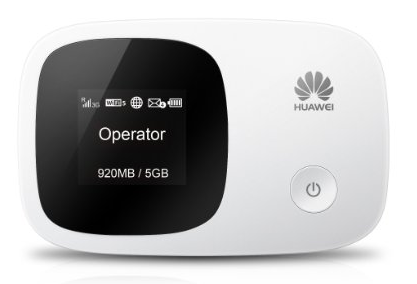 Huawei E5336 3G Mobile Pocket WiFi Hotspot Router
 * 1.4 inch TFT-LCD screen display
* One touch connection, 5 seconds fast boot
* Built-in UMTS and WLAN high gain antenna
* External Antenna Connector: No
Download (Télécharger) Firmware Update Huawei E5336 Huawei E5336 (E5336s) Unlocked Full Specs, Features, Reviews and Price:
| General | |
|---|---|
| Model | E5336 |
| Sub Model | E5336s-2 |
| Brand | HUAWEI |
| Type | 3G Mobile WiFi |
| Ports | 1x Micro USB |
| Dimensions | |
|---|---|
| Weight | <79 g |
| Height | 93.2 mm |
| Width | 60 mm |
| Depth | 14.5 mm |
| Frequency Bands | |
|---|---|
| 3G: WCDMA/UMTS | 900 MHz, 2100 MHz |
| 2G: GSM/GPRS/EDGE | 850 MHz, 900 MHz, 1800 MHz, 1900 MHz |
| Connectivity Speed | |
|---|---|
| WI-FI | 72.2 Mbps |
| HSDPA | 21.6 Mbps |
| HSUPA | 5.76 Mbps |
| UMTS | 384 kbps |
| EDGE | 236.8 kbps |
| GPRS | 85.6 kbps |
| Battery | |
|---|---|
| Type | Li-ion battery |
| Capacity | 3.7v, 1500mAh |
| Life Time | 6 Hours |
| Standby Time | 300 Hours |
| Memory Support | |
|---|---|
| Memory Capacity | 32 GB |
| Memory Card Slot | SD Card |
| WiFi Connection | |
|---|---|
| WLAN Band | 2.4G |
| Protocol | IEEE 802.11b/g/n |
| Encryption | WEP, WPA, WPA2 |
| Wi-Fi Devices | 10 Users |
| Additional Features | |
|---|---|
| SMS Service | Yes |
| Plug and Play (PnP) | Yes |
| LED Indicator | Yes |
| SD Card Slot | No |
| Other Features | Ethernet/3G dual link, Web UI, Auto connect, support MIMO, Traffic statistic |
| System Requirements | |
|---|---|
| Operating System | Windows 2000 * Windows XP * Windows Vista * Windows 7 & 8 * Mac * Linux |
Unlock Huawei E5336 Pocket 3G Portable Router
Available link for download
Thursday, November 17, 2016
Keep Wifi during sleep buggy
Keep Wifi during sleep buggy
Hi, Ive tried many custom Roms like cm13 both official and unofficial, AOSPA, VO OS , hexagon but keep wifi on during sleep is buggy. Firstly I takes quite a while for it to turn off and when I does it doesnt connect back properly eg. It says scanning for networks but there arent any so to fix this I have to turn it off then back on for it to connect. Anone else experience this and is there any Roms without this issue or is it an issue across all Roms? Thanks
from xda-developers http://ift.tt/2aEzmYi
via IFTTT
Available link for download
Friday, November 11, 2016
Mobile Counter Pro – 3G WIFI v3 1 Apk Full App Free Download
Mobile Counter Pro – 3G WIFI v3 1 Apk Full App Free Download
Mobile Counter Pro – 3G, WIFI v3.1
Requirements: Android 2.1 and up
Overview: Application to count network traffic (GSM/CDMA/WIFI)
Requirements: Android 2.1 and up
Overview: Application to count network traffic (GSM/CDMA/WIFI)


Application to count network traffic
(GSM/CDMA/WIFI)
Mobile Counter(3G, WiFi, network traffic) – application to count network data GSM/CDMA/WIFI
Languages support: English, German, Slovak, Polish, Chinese, Romanian, French, Italian, Portuguese, Russian, Czech
Calculation types:
- Standard counting(default)
- Enable/Disable rounding in blocks (e.g to 100KB for session)
- Enable/Disable separately round outgoing and incoming transfer to block of data
- Disable couting outgoing(sent) transfer
Mobile Counter(3G, WiFi, network traffic) – application to count network data GSM/CDMA/WIFI
Languages support: English, German, Slovak, Polish, Chinese, Romanian, French, Italian, Portuguese, Russian, Czech
Calculation types:
- Standard counting(default)
- Enable/Disable rounding in blocks (e.g to 100KB for session)
- Enable/Disable separately round outgoing and incoming transfer to block of data
- Disable couting outgoing(sent) transfer
Example calculation without blocks:
Received 134 KB, sent 455 KB –> Will be saved 134+455=589 KB
Example calculation with blocks of data:
Basic carrier unit (block of data): 100 KB
When disable separately rounding:
Received 134 KB, sent 455 KB –> after disable mobile network in your phone will be saved: 134+455=589 (round to 600 KB)->600 KB
When enable separately rounding outgoing and incoming data (you have to enable separately rouning in application options):
Received 134 KB, sent 455 KB –> after disable mobile network in your phone will be saved: 134 (round to 200 KB)+455 (round to 500 KB)=700 KB
Similar application to 3G watchdog, netCounter, netTraffic, network traffic,
Application without ADS and for free. Extended functionality has been added for users who donate application.
You decide how worth/useful this application is for you, so you can donate with value you want
New functionality for users who donate application:
- More widgets 2X1(WIFI, transfer limits, billingperiod)
- More widgets 1X1(GSM, WIFI, transfer limits, billing period)
- New styles for notification bar (limit transfer, mobile GSM/CDMA, billing period)
- Transfer used by application (req. android>2.1)
- Export/Import data to SD card
- Billing period calculation
- Option to not counting sent transfer
- Option to set alerts when transfer limit less than … (in MB) will expire in … (days)
- Option to enable vibration when transfer limit will be exceeded
- Option to set first day in week (Saturday, Sunday, Monday)
- Show application icon in notification only when enable GSM/CDMA/WIFI
- Set expiration period in days, weeks, months
- Option to count separately transfer for one WIFI SSID e.g to count hotspot traffic
- New statistics (for billing period, WIFI SSID)
- Option to add not used transfer from last period to next
Received 134 KB, sent 455 KB –> Will be saved 134+455=589 KB
Example calculation with blocks of data:
Basic carrier unit (block of data): 100 KB
When disable separately rounding:
Received 134 KB, sent 455 KB –> after disable mobile network in your phone will be saved: 134+455=589 (round to 600 KB)->600 KB
When enable separately rounding outgoing and incoming data (you have to enable separately rouning in application options):
Received 134 KB, sent 455 KB –> after disable mobile network in your phone will be saved: 134 (round to 200 KB)+455 (round to 500 KB)=700 KB
Similar application to 3G watchdog, netCounter, netTraffic, network traffic,
Application without ADS and for free. Extended functionality has been added for users who donate application.
You decide how worth/useful this application is for you, so you can donate with value you want
New functionality for users who donate application:
- More widgets 2X1(WIFI, transfer limits, billingperiod)
- More widgets 1X1(GSM, WIFI, transfer limits, billing period)
- New styles for notification bar (limit transfer, mobile GSM/CDMA, billing period)
- Transfer used by application (req. android>2.1)
- Export/Import data to SD card
- Billing period calculation
- Option to not counting sent transfer
- Option to set alerts when transfer limit less than … (in MB) will expire in … (days)
- Option to enable vibration when transfer limit will be exceeded
- Option to set first day in week (Saturday, Sunday, Monday)
- Show application icon in notification only when enable GSM/CDMA/WIFI
- Set expiration period in days, weeks, months
- Option to count separately transfer for one WIFI SSID e.g to count hotspot traffic
- New statistics (for billing period, WIFI SSID)
- Option to add not used transfer from last period to next
Needed permissions:
android.permission.ACCESS_WIFI_STATE – to check if WIFI is enable/disable
android.permission.ACCESS_NETWORK_STATE – to check if GSM is enable/disable
android.permission.WRITE_EXTERNAL_STORAGE – to save exported transfer to SD card
android.permission.READ_PHONE_STATE – to read id_device (id_device is require to generate unique activation code for extended functionality for user who donate app)
android.permission.VIBRATE – to enable vibration when transfer limit will be exceeded (optional in settings)
No permissions to network, so application doesn’t send any information from phone.
Please check if GSM/CDMA/WIFI works for you on your phone before donate.
android.permission.ACCESS_WIFI_STATE – to check if WIFI is enable/disable
android.permission.ACCESS_NETWORK_STATE – to check if GSM is enable/disable
android.permission.WRITE_EXTERNAL_STORAGE – to save exported transfer to SD card
android.permission.READ_PHONE_STATE – to read id_device (id_device is require to generate unique activation code for extended functionality for user who donate app)
android.permission.VIBRATE – to enable vibration when transfer limit will be exceeded (optional in settings)
No permissions to network, so application doesn’t send any information from phone.
Please check if GSM/CDMA/WIFI works for you on your phone before donate.
What’s in this version :
Version 3.1
-Option to stop counting between hours now has impact on all fields, not only for plan traffic as it was in past
-Option to stop counting was moved to section advanced in settings
-Option to exclude apps from counting (beta)
-Improvements nad bugs fixing
Version 3.1
-Option to stop counting between hours now has impact on all fields, not only for plan traffic as it was in past
-Option to stop counting was moved to section advanced in settings
-Option to exclude apps from counting (beta)
-Improvements nad bugs fixing
This app has no advertisements
More Info:
Code:
https://play.google.com/store/apps/details?id=com.mobileCounterPro Download zippyshare
Available link for download
Monday, October 10, 2016
Huawei E5838 Mobile WiFi
Huawei E5838 Mobile WiFi
 Huawei E5838 3G Pocket Mobile WiFi Hotspot
* 3G: HSDPA/HSUPA/UMTS
* 2G: GSM/GPRS/EDGE
* Built-in UMTS and WLAN high gain antenna
* Wi-Fi 802.1b/g
* External Interface: USB interface: Mini USB; SIM/USIM card interface: standard 6 PIN SIM card interface
Huawei E5838 Full Specification, Review, Features:
| General | |
|---|---|
| Model | E5838 |
| Brand | HUAWEI |
| Type | Mobile WiFi Hotspot |
| Ports | 1x Micro USB |
| Mobile WiFi | |
|---|---|
| Chipset | ? |
| Firmware | ? |
| Hardware ver. | ? |
| Dimensions | |
|---|---|
| Weight | <90 g |
| Height | 48.6 mm |
| Width | 95.5 mm |
| Depth | 13.7 mm |
| Network Access | |
|---|---|
| 3G Bands | 2100 MHz |
| 2G Bands | 850/900/1800/1900 MHz |
| Connectivity Speed | |
|---|---|
| HSDPA | 7.2 Mbps |
| HSUPA | 5.76 Mbps |
| UMTS | 384 kbps |
| EDGE | 236.8 kbps |
| GPRS | 85.6 kbps |
| Battery | |
|---|---|
| Type | Li-ion battery |
| Capacity | 3.7v, 1500mAh |
| Life Time | 5 Hours |
| Standby Time | 100 Hours |
| System Requirements | |
|---|---|
| Operating System | Windows 2000 * Windows XP * Windows Vista * Windows 7 & 8 * Mac * Linux |
Huawei E5838 7.2 Mbps 3G Mobile WiFi Hotspot
how to unlock Huawei E5838 wireless router, unlock code Huawei E5838 pocket wifi hotspot, Huawei E5838 review, Huawei E5838 unlock code generator, Huawei E5838 free unlocking guides and instructions, Huawei E5838 specification, Huawei unlock update firmware download drivers, download latest Huawei E5838 firmware update, déblocage Huawei E5838 mifi
Available link for download
Saturday, September 24, 2016
Huawei E5221 Pocket Mobile WiFi
Huawei E5221 Pocket Mobile WiFi
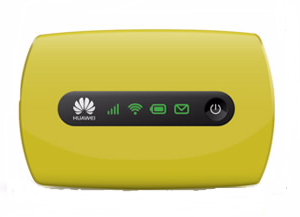 Huawei E5221 3G Mobile Pocket WiFi Hotspot Router
 * Equalizer and receive diversity
* No microSD card slot & External antenna interface
* One touch connection, 5 seconds fast boot
* LED indicators: Signal, Wi-Fi, Battery, SMS
Download (Télécharger) Firmware Update Huawei E5221 Huawei E5221 Unlocked Full Specs, Features, Reviews and Price:
| General | |
|---|---|
| Model | E5221 |
| Brand | HUAWEI |
| Type | 3G Mobile WiFi |
| Ports | 1x Micro USB |
| Dimensions | |
|---|---|
| Weight | <58 g |
| Height | 57 mm |
| Width | 90.5 mm |
| Depth | 14.6 mm |
| Network Access | |
|---|---|
| 3G: HSPA+/UMTS | 900 MHz, 2100 MHz |
| 2G: GSM/GPRS/EDGE | 850 MHz, 900 MHz, 1800 MHz, 1900 MHz |
| Connectivity Speed | |
|---|---|
| HSPA+ | 21.6 Mbps |
| HSDPA | 14.4 Mbps |
| HSUPA | 5.76 Mbps |
| UMTS | 384 kbps |
| EDGE | 236.8 kbps |
| GPRS | 85.6 kbps |
| Battery | |
|---|---|
| Type | Li-ion battery |
| Capacity | 3.7v, 1500mAh |
| Life Time | 4 Hours |
| Standby Time | 280 Hours |
| WiFi Connection | |
|---|---|
| Protocols | IEEE 802.11b/g/n |
| Encryption | WEP, WPA, WPA2 |
| Wi-Fi Devices | 10 Users |
| System Requirements | |
|---|---|
| Operating System | Windows 2000 * Windows XP * Windows Vista * Windows 7 & 8 * Mac |
Unlock Huawei E5221 Pocket 3G Portable Router
Available link for download
Wednesday, August 31, 2016
Déblocage Unlock Huawei E5 Pocket Mobile WiFi Hotspot
Déblocage Unlock Huawei E5 Pocket Mobile WiFi Hotspot
Cette solution de déblocage par code fonctionne avec les routeurs Huawei E5 appelés Pocket Mobile Hotspot ou Mobile WiFi, ces modèles proposent un accès internet haut débit suffisant pour partager votre connexion internet entre plusieurs ordinateurs et autres types d’appareils avec un dispositif Wi-Fi (iPad, iPhone, iTouch, Windows Phone, Smartphone, Tablette).
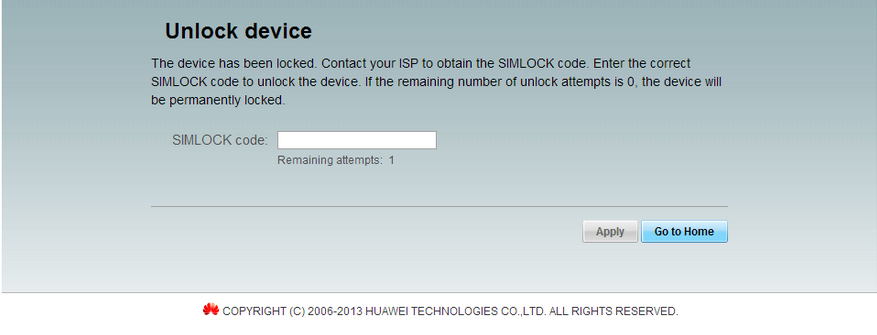
ACHETEZ VOTRE CODE DE DÉBLOCAGE – MAINTENANT! Notre service de déblocage vous offre la possibilité dobtenir votre code de déblocage en 5 minutes, satisfaction 100% garantie. COMMANDEZ MAINTENANT. Il est dangereux dutiliser des codes erronés pour débloquer votre routeur Huawei, si vous dépassez le nombre de tentatives autorisées votre appareil sera bloqué définitivement. Vous pouvez essayer de générer votre code de déblocage à partir de: Huawei Calculator v3 ou IMEI Unlock Code Generator
pocket wifi router, portable 3g router, wirelss hotspot, mobile mifi wifi hotspot, pocket mobile wifi, huawei code calculator v201 algo, unlock huawei, huawei unlock code calculator, unlock huawei, deverrouiller, cracker, deverrouillage, deblocage, huawei calculator v3, huawei imei calculator, huawei modem code generator, NCK codes, flash code calculator, modem unlock, online huawei calculator new algo, simlock code, unlock sim code, sim unlock code
Available link for download
Monday, August 29, 2016
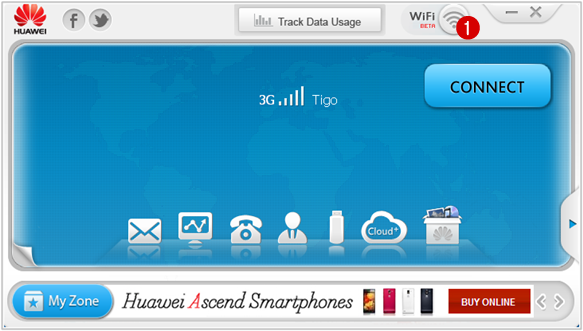
How to Share Internet Connection Mobile Partner WiFi Hotspot
How to Share Internet Connection Mobile Partner WiFi Hotspot
Huawei Technologies Co., Ltd .. sells routers 3G / 4G mobile high performance, these WiFi Hotspot offer many advantages in terms of connection speed and their use is ideal when moving. You can share your Internet connection with multiple devices equipped with Wi-Fi device (iPad, iPhone, iTouch, Playstation III, tablet, smartphone, Xbox 360).



Wireless Device
Available link for download
Subscribe to:
Posts (Atom)