Showing posts with label pure. Show all posts
Showing posts with label pure. Show all posts
Sunday, December 25, 2016
Install CM13 0 Nightly Android 6 0 1 Marshmallow on Moto X Pure 2015 Latest Build
Install CM13 0 Nightly Android 6 0 1 Marshmallow on Moto X Pure 2015 Latest Build

The Moto X line is a smartphone thats always been dancing around greatness.
In other hand The Moto X Pure Edition is as amazing as it looks, with water- repellent coating and a 21 MP camera.
If you are looking to install a new custom ROM on your Moto X Pure (2015) then we have here as usual the best Custom ROMs for you.
CyanogenMod 13 [CM13.0] Nightly ROM latest build cm-13.0-20160520-NIGHTLY-osprey.zip is released for Moto X Pure (2015) clark
CM13.0 will let Moto X Pure (2015) clark users taste the sweetness of Marshmallow 6.0.1 such as the battery saving ‘doze’ functionality and new permissions model, alongside the CM features you’d expect.
Follow our guide below to download the Unofficial CM13.0 and install it yourself.
View my Flipboard Magazine.
÷ Prerequisites:
•This tutorial is only for installing CyanogenMod 13 [CM13.0] Nightly ROM on Moto X Pure (2015) clark. Please do not try on any other Moto X variants.
•Your phone should be rooted and haveClockworkMod recovery installed from before.
•This tutorial will wipe out all your data.Proceed at your own risk.Perform a Dalvik Cache wipe before proceeding from the recovery mode.
•Make sure you backup all your data in your phone before proceeding.

*Disclaimer:
Android Custom ROM fix ® provide various Firmware Updates and Rooting process along with Custom ROM,Modes,file are all belong to their owners/developers. The autor of this site or the developers are not responsible, if you damage or brick your device.Do it on your own risk and follow the instruction properly.
* Important:
Backup important files stored on your device before proceeding with the steps below, so that in case something goes wrong you’ll have backup of all your important files.
÷ How to Install CM13.0 Nightly Android 6.0.1 Marshmallow on Moto X Pure (2015)
Step 1 – Download CM13.0 Android 6.0.1 Marshmallow and Google Apps for your Moto X Pure (2015) to your computer.
Step 2 – Connect and mount your Moto X Pure (2015) USB memory on your computer using the USB cable.
Step 3 – Now copy/paste the downloaded Android 6.0.1 ROM zip file and Google Appszip files to your SD card. Make sure the files are in the SD card root (not in any folder).
Step 4 – Then turn OFF your phone and disconnect from the USB cable.
Step 5 – Now to get in the Recovery Mode. Switch ON the phone while pressing and holding Volume Up + Home + Power buttons together
Step 6 – Once you are in ClockworkModRecovery, select perform a full data wipe by selecting “wipe data/factory reset”. Use the Power button to select everything while in the Recovery Mode.
Step 7 – Then, perform a cache wipe by selecting “wipe cache partition” .
Step 8 – Now this is optional, but it is recommended to perform a wipe of your dalvik cache as well. You will not get into boot loops or any other errors. From CWM recovery, go to ‘advanced’ and then select “wipe dalvik cache”.
Step 9 – Then go back to the main recovery screen and select “install zip from SD card”.
Step 10 – Now select “choose zip from sdcard”. Using your volume keys, navigate to the Android 6.0.1 ROM zip file that you copied to your SD card and select it using the Power button. Confirm the installation on the next screen and the installation procedure should start now.
Google Apps: Repeat the above step for the Gapps zip file as well and install it on your phone.
Step 11 – After the installation completes, go to “+++++Go Back+++++” and reboot the phone by selecting “reboot system now” from the recovery menu.

Your Moto X Pure (2015) will boot now and it might take about 5 minutes to boot on your first time. So, please wait.
That’s it Your Moto X Pure (2015) should now have CM13.0 Nightly Android 6.0.1 Marshmallow latest build installed on your phone! Go to Settings > About phone to verify.
For More Moto X Pure (2015) Brand New Firmware & Custom ROM keep checking AndroidCustomROM Fix ™®
Like this post? PLZ Hit the share buttons below to share this article with your friends on Facebook, Google + and Twitter.
PLZ Follow Us On Flipboard 4 More latest custom ROM fix.
PLZ Use the comment box below to contribute more ideas & Suggestions .
Best Regards.<
÷ Prerequisites:
•This tutorial is only for installing CyanogenMod 13 [CM13.0] Nightly ROM on Moto X Pure (2015) clark. Please do not try on any other Moto X variants.
•Your phone should be rooted and haveClockworkMod recovery installed from before.
•This tutorial will wipe out all your data.Proceed at your own risk.Perform a Dalvik Cache wipe before proceeding from the recovery mode.
•Make sure you backup all your data in your phone before proceeding.
*Disclaimer:
Android Custom ROM fix ® provide various Firmware Updates and Rooting process along with Custom ROM,Modes,file are all belong to their owners/developers. The autor of this site or the developers are not responsible, if you damage or brick your device.Do it on your own risk and follow the instruction properly.
* Important:
Backup important files stored on your device before proceeding with the steps below, so that in case something goes wrong you’ll have backup of all your important files.
÷ How to Install CM13.0 Nightly Android 6.0.1 Marshmallow on Moto X Pure (2015)
Step 1 – Download CM13.0 Android 6.0.1 Marshmallow and Google Apps for your Moto X Pure (2015) to your computer.
Step 2 – Connect and mount your Moto X Pure (2015) USB memory on your computer using the USB cable.
Step 3 – Now copy/paste the downloaded Android 6.0.1 ROM zip file and Google Appszip files to your SD card. Make sure the files are in the SD card root (not in any folder).
Step 4 – Then turn OFF your phone and disconnect from the USB cable.
Step 5 – Now to get in the Recovery Mode. Switch ON the phone while pressing and holding Volume Up + Home + Power buttons together
Step 6 – Once you are in ClockworkModRecovery, select perform a full data wipe by selecting “wipe data/factory reset”. Use the Power button to select everything while in the Recovery Mode.
Step 7 – Then, perform a cache wipe by selecting “wipe cache partition” .
Step 8 – Now this is optional, but it is recommended to perform a wipe of your dalvik cache as well. You will not get into boot loops or any other errors. From CWM recovery, go to ‘advanced’ and then select “wipe dalvik cache”.
Step 9 – Then go back to the main recovery screen and select “install zip from SD card”.
Step 10 – Now select “choose zip from sdcard”. Using your volume keys, navigate to the Android 6.0.1 ROM zip file that you copied to your SD card and select it using the Power button. Confirm the installation on the next screen and the installation procedure should start now.
Google Apps: Repeat the above step for the Gapps zip file as well and install it on your phone.
Step 11 – After the installation completes, go to “+++++Go Back+++++” and reboot the phone by selecting “reboot system now” from the recovery menu.
Your Moto X Pure (2015) will boot now and it might take about 5 minutes to boot on your first time. So, please wait.
That’s it Your Moto X Pure (2015) should now have CM13.0 Nightly Android 6.0.1 Marshmallow latest build installed on your phone! Go to Settings > About phone to verify.
For More Moto X Pure (2015) Brand New Firmware & Custom ROM keep checking AndroidCustomROM Fix ™®
Like this post? PLZ Hit the share buttons below to share this article with your friends on Facebook, Google + and Twitter.
PLZ Follow Us On Flipboard 4 More latest custom ROM fix.
PLZ Use the comment box below to contribute more ideas & Suggestions .
Best Regards.<
Available link for download

Thursday, December 15, 2016
How to Install Android 6 0 1 Marshmallow Pure White ROM on Nexus 5
How to Install Android 6 0 1 Marshmallow Pure White ROM on Nexus 5
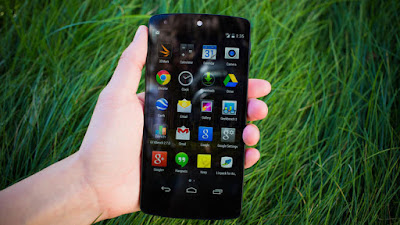
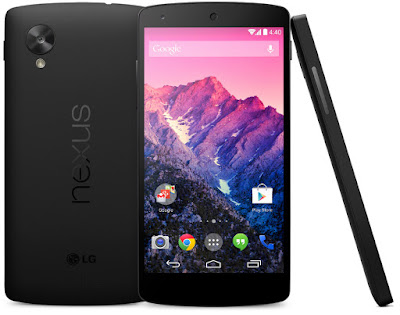
Nexus 5 Pure White custom ROM comes with tons of new features and is based on Android 6.0.1 Marshmallow. A quick list of the main features in Pure White is given below and we are sure you’d love to use this on your Nexus 5:
Base Factory Image Google MOB30P 6.0.1
Layers fully supported
Odex
Stock kernel MOB30P
Ads disabled
Audio enhancements
New Statusbar icon
New Softkey
Ambient display
N notifications
Reduced navbar
Used daily~super stable
General improvements
Google home
Google now
LockClock
Apollo music
Aosp Browser
GoogleCamera
Gallery Aosp
Video Player
Aosp keyboard
Aosp calendar
Calendar sync
Omni calendar widget
Aosp Mms
Aosp email
Stk sim....

÷ Prerequisites:
•This Android 6.0.1 Pure White ROM tutorial is only for Nexus 5 (hammerhead) and I am not sure if it will work on the other variants of the Nexus 5 on other carriers.
•Make sure your phone is rooted and has a custom recovery like ClockworkMod installed.
•Make a Nandroid backup of your previous phone set up before proceeding – for just in case anything goes wrong.
View my Flipboard Magazine.
*Disclaimer:
Android Custom ROM fix ® provide various Firmware Updates and Rooting process along with Custom ROM,Modes,file are all belong to their owners/developers. The autor of this site or the developers are not responsible, if you damage or brick your device.Do it on your own risk and follow the instruction properly.
* Important:
Backup important files stored on your device before proceeding with the steps below, so that in case something goes wrong you’ll have backup of all your important files.
÷ How to Install Android 6.0.1 Marshmallow Pure White ROM on Nexus 5 :
Step 1 – Download Android 6.0.1 Pure White ROM for Nexus 5 on your PC, if you haven’t already.
Step 2 – Connect and mount your Nexus 5 USB memory on your computer using the USB cable.
Step 3 – Now copy/paste the downloaded Android 6.0.1 ROM zip file to your internal SD card. Make sure the file is in the SD card root (not in any folder).
Step 4 – Then turn OFF your phone and disconnect from the USB cable.
Step 5 – Now to get in the Bootloader Mode. Turn ON the phone while pressing and holding the Volume Up + Volume Down and Power buttons.
Step 6 – Follow the navigation instructions on the screen. Select BOOTLOADER and then go to RECOVERY.
Step 7 – Once you are in ClockworkMod Recovery, select perform a full data wipe by selecting “wipe data/factory reset”. Use the Power button to select everything while in the Recovery Mode.
Step 8 – Then, perform a cache wipe by selecting “wipe cache partition” .
Step 9 – Now this is optional, but it is recommended to perform a wipe of your dalvik cache as well. You will not get into boot loops or any other errors. From CWM recovery, go to ‘advanced’ and then select “wipe dalvik cache”.
Step 10 – Then go back to the main recovery screen and select “install zip from SD card”.
Step 11 – Now select “choose zip from sdcard”. Using your volume keys, navigate to the Android 6.0.1 ROM zip file that you copied to your SD card and select it using the Power button. Confirm the installation on the next screen and the installation procedure should start now.
Step 12 – After the installation completes, go to “+++++Go Back+++++” and reboot the phone by selecting “reboot system now” from the recovery menu .
Your Nexus 5 will boot now and it might take about 5 minutes to boot on your first time. So, please wait.
That’s it! Your Nexus 5 should now have Android 6.0.1 Pure White Marshmallow custom ROM installed on your phone! Go to Settings > About phone to verify.
For More Nexus 5 Updates Keep Checking Android Custom ROM Fix ™®
That’s all. We hope this guide serves you well. If there’s anything you’d like to be added/changed on this page, PLZ Use the comment box below to contribute more ideas & Suggestions .
Like this post? PLZ Hit the share buttons below to share this article with your friends on Facebook, Google + and Twitter.
Want the latest Updates Sign up for our newsletters!
PLZ Follow Us On Flipboard 4 More Latest Updates.
Best Regards.™
*Disclaimer:
Android Custom ROM fix ® provide various Firmware Updates and Rooting process along with Custom ROM,Modes,file are all belong to their owners/developers. The autor of this site or the developers are not responsible, if you damage or brick your device.Do it on your own risk and follow the instruction properly.
* Important:
Backup important files stored on your device before proceeding with the steps below, so that in case something goes wrong you’ll have backup of all your important files.
÷ How to Install Android 6.0.1 Marshmallow Pure White ROM on Nexus 5 :
Step 1 – Download Android 6.0.1 Pure White ROM for Nexus 5 on your PC, if you haven’t already.
Step 2 – Connect and mount your Nexus 5 USB memory on your computer using the USB cable.
Step 3 – Now copy/paste the downloaded Android 6.0.1 ROM zip file to your internal SD card. Make sure the file is in the SD card root (not in any folder).
Step 4 – Then turn OFF your phone and disconnect from the USB cable.
Step 5 – Now to get in the Bootloader Mode. Turn ON the phone while pressing and holding the Volume Up + Volume Down and Power buttons.
Step 6 – Follow the navigation instructions on the screen. Select BOOTLOADER and then go to RECOVERY.
Step 7 – Once you are in ClockworkMod Recovery, select perform a full data wipe by selecting “wipe data/factory reset”. Use the Power button to select everything while in the Recovery Mode.
Step 8 – Then, perform a cache wipe by selecting “wipe cache partition” .
Step 9 – Now this is optional, but it is recommended to perform a wipe of your dalvik cache as well. You will not get into boot loops or any other errors. From CWM recovery, go to ‘advanced’ and then select “wipe dalvik cache”.
Step 10 – Then go back to the main recovery screen and select “install zip from SD card”.
Step 11 – Now select “choose zip from sdcard”. Using your volume keys, navigate to the Android 6.0.1 ROM zip file that you copied to your SD card and select it using the Power button. Confirm the installation on the next screen and the installation procedure should start now.
Step 12 – After the installation completes, go to “+++++Go Back+++++” and reboot the phone by selecting “reboot system now” from the recovery menu .
Your Nexus 5 will boot now and it might take about 5 minutes to boot on your first time. So, please wait.
That’s it! Your Nexus 5 should now have Android 6.0.1 Pure White Marshmallow custom ROM installed on your phone! Go to Settings > About phone to verify.
For More Nexus 5 Updates Keep Checking Android Custom ROM Fix ™®
That’s all. We hope this guide serves you well. If there’s anything you’d like to be added/changed on this page, PLZ Use the comment box below to contribute more ideas & Suggestions .
Like this post? PLZ Hit the share buttons below to share this article with your friends on Facebook, Google + and Twitter.
Want the latest Updates Sign up for our newsletters!
PLZ Follow Us On Flipboard 4 More Latest Updates.
Best Regards.™
Available link for download
Monday, September 26, 2016
Blu Pure XL not turn
Blu Pure XL not turn
Hey guys Im new here , I have a blu pure xl , I was flashing it with TWRP Recovery but hung up the phone holding the volume button + and the power button and unplug it .But now he does not want to call when you hold the button of power , he or vibrating . Not holding the volume button + power button and he does not care , someone help me? I am Brazilian then sorry for the English rs , when I turn blu pure xl charger nothing happens , priate care in the computer, the computer recognizes and passes 5 seconds disconnects , and is thus , as I would have flashed it for PC ? What do I do ?
Thank you very much in advance.
Thank you very much in advance.
from xda-developers http://ift.tt/29VYqgE
via IFTTT
Available link for download
Sunday, September 18, 2016
How to Install Android 6 0 1 Marshmallow Pure Nexus ROM on Nexus 5 D820 Pre rooted
How to Install Android 6 0 1 Marshmallow Pure Nexus ROM on Nexus 5 D820 Pre rooted
According to XDA Member Beanstown106,Android 6.0.1 Marshmallow Pure Nexus ROM is available now for LG Nexus 5 D820 [ hammerhead].

The Pure Nexus Project aims to bring stability and features to your Nexus device, while keeping Googles vision in line and not straying too far away from that. If you are looking for a stable ROM with true tested features and minimal bugs, then this is the place to be.
÷ ROM Features:
-General
*Based on AOSP Android 6.0.1_r25(newer than r43)
*Pre-rooted with SuperSU 2.68
*SELinux Enforcing
*Busybox
*Init.d support
*Addon.d support
*Fully Working VoLTE
*Native Sprint PRL/Profile update
*Native ntfs and exfat support
*Full Layers and Theme engine support
*Google sounds from factory image not the horrible AOSP ones
*Googles marshmallow wallpapers added to wallpaper picker
*Advanced Reboot menu enabled by default
*Advanced rotation settings
*Enabled Developer settings by default
*Enabled option to use multi-window mode
*Enabled click/longclick on notification panel header items
*Disabled forced encryption
*Disabled Tethering checks
*Disable Full screen keyboard in landscape option
*Show apps being optimized during initial boot
*Bug fixs and stability improvements
*UI Improvements (fixed a bunch google forgot to materialize)
*Download Speed in download notifications
*Scrolling cache improvements
*Seek-bar animation speed and font size control
*Hostname customization
*Adb over wifi access
*Full 3-Minit battery support no mods needed
*Kitkat style silent mode is now default
*Added headset icon attached icon in statusbar
*Added PureAmbient display options
*Added Full CAF Based AppOps
*Added ability to see app version when sideloading app
*Added ability to launch app from app info sceen
*Added app package name to app info screen
*Added ability to disable battery saver color in nav/statusbars
*Added ability to launch purenexus settings from notification drawer (longpress settings icon)
*Added ability to customize Settings dashboard columns, dashboard text lines, dashboard dividers
*Added wireless charging sound for usb chargers
*Native Dialer lookup in the aosp dialer
*Increasing ringtone option
*Incall vibration options
*Proximity speakerphone option
*National Data roaming option
*Call/Message blocking
*Flip to mute/reject call option
*Link/Unlink Notification ringtone option
*Added Standalone documents ui file manager
*Added Special keys to all keyboard keys
*Added more smileys to the aosp keyboard
*Removed googles bug report option
*Removed googles SystemUpdate option
*Removed googles legal information
-PureNexus Settings
Lock Screen
*Option to customize lockscreen shortcuts
*Option to customize lockscreen weather
*Option to customize lockscreen clock font
*Long press power for torch
*double tap anywhere to sleep
*Option to disable lockscreen media art
*Scramble pin layout
*Quick pin unlock
*options to unlock straight to pin/pattern/password entry
*option to hide lockscreen clock
*option to hide lockscreen date
*option to hide lockscreen alarm text
*Option to control max notifications on the lockscreen
*option to set the alpha of lockscreen and lockscreen security bouncer
*Lockscreeen Wallpaper (add/crop/delete)
Notification Drawer
*Weather
*Force Expanded Notifications
*quick settings pulldown (left,right,always)
*smart pulldown (no ongoing, no dismissable)
*brightness slider on/off toggle
*option for time aware contexual notification header images
*option for poly hd notification header images
*fully customizable quick settings with now up to 30 custom tiles
*option to enable or disable the top two main quicksettings tiles
*option to enable 3/4/5 quick settings tiles per row
*option for advanced location in location quick setting tile
*option to enable vibration on quick settings tiles
*option to disable quick settings on secure lockscreen
Recent Apps
*Immersive recents (stock, full screen, statusbar only, navbar only)
*Clear all recents toggle
*Clear all recents location option
*Clear all recents but last app toggle
*Recent searchbar on/off toggle
*slim recents and slim recent options
Statusbar
*Battery customization (stock, landscape, circle, dotted circle, text, none)
*Battery percent options (hidden, inside the icon, next to the icon)
*Battery Bar options (location, color, style, thickness, anitmation)
*Carrier Text customization (text placement, custom text)
*Clock customization (position, am/pm, date, date position, date style, date format)
*Network traffic meter options (disabled/incoming/outgoing/both, units displayed, update interval, hide arrows, autohide, autohidethreshold)
*Status-bar options (purenexus icon, notification counter, double-tap to sleep, statusbar brightness control)
*Option to disable headset icon, vibrate/silent icon, vpn icon in statusbar
*Option to disale bluetooth icon in statusbar when not connected
Navigation Bar
*Enable/disable
*IME toggle
*Option for arrow cursor keys
*Option for double tap navbar to sleep
*Long-press back to kill toggle
*option to configure back kill delay
*Long-press recents for last app toggle
*Navigation bar size customization (width, height, length)
*Navigation bar customization (placement, buttons)
PowerMenu
*Option to disable on secure lock
*Add/remove (reboot, screenshot, screen-record, torch, airplane mode, user switcher,settings shortcut, search, voice search, lock now, sound panel)
Volume Rocker
*Volume key wake
*Volume key music control
*Volume key keyboard cursor control
*Volume button swap toggle
*Control media volume anytime toggle
*Option to allow volume down in silent to enter do not disturb
*Option to allow volume up in do not disturb to exit do not disturb
*Options to control volume steps on the fly
Display
*Expanded desktop options
*option to enable/disable wake on plug
*option to enable 3 finger swipe to screenshot
*LED controls
Media & Notifications
*option to disable camera shutter sound
*option to disable double tap camera vibration
*custom heads up options (global on/off, timeout, heads up snooze, force heads up, heads up whitelist, heads up do not disturb, heads up blacklist)
*option to disable low battery notification
*Option to disable battery saver notification
cLock Settings
*Customize the cLock widget
Tools and info
*device info
*battery history
*usage statistics
*wifi info
*build.prop editor
*fi switch tools (if project fi sim is installed)...

÷ Prerequisites:
•This tutorial is only for installing Android 6.0.1 Marshmallow Pure Nexus ROM is available now for LG Nexus 5 D820 [ hammerhead].Please do not try on any other Nexus 5 variants.
•Your phone should be rooted and haveClockworkMod recovery installed from before.
•This tutorial will wipe out all your data.Proceed at your own risk.Perform a Dalvik Cache wipe before proceeding from the recovery mode.
•Make sure you backup all your data in your phone before proceeding.
View my Flipboard Magazine.
*Disclaimer:
Android Custom ROM fix ® provide various Firmware Updates and Rooting process along with Custom ROM,Modes,file are all belong to their owners/developers. The autor of this site or the developers are not responsible, if you damage or brick your device.Do it on your own risk and follow the instruction properly.
* Important:
Backup important files stored on your device before proceeding with the steps below, so that in case something goes wrong you’ll have backup of all your important files.

ROM Download & Installation Instructions via XDA
For More Nexus 5 updates Keep Checking Android Custom ROM Fix™®
Like this post? PLZ Hit the share buttons below to share this article with your friends on Facebook, Google + and Twitter.
PLZ Follow Us On Flipboard 4 More Latest Updates.
PLZ Use the comment box below to contribute more ideas & Suggestions .
Best Regards.
*Disclaimer:
Android Custom ROM fix ® provide various Firmware Updates and Rooting process along with Custom ROM,Modes,file are all belong to their owners/developers. The autor of this site or the developers are not responsible, if you damage or brick your device.Do it on your own risk and follow the instruction properly.
* Important:
Backup important files stored on your device before proceeding with the steps below, so that in case something goes wrong you’ll have backup of all your important files.
ROM Download & Installation Instructions via XDA
For More Nexus 5 updates Keep Checking Android Custom ROM Fix™®
Like this post? PLZ Hit the share buttons below to share this article with your friends on Facebook, Google + and Twitter.
PLZ Follow Us On Flipboard 4 More Latest Updates.
PLZ Use the comment box below to contribute more ideas & Suggestions .
Best Regards.
Available link for download
Subscribe to:
Comments (Atom)