A few weeks back my android device was infected with some adware.This adware automatically opens the play store and installs random apps.If i uninstall the app,it immediately opens the play store again.This wasnt the first time an adware was installed on my device without my knowledge.I simply uninstall the adware from my device whenever this situation occurred however this was different.The adware had installed itself as a system app so it couldnt be uninstalled as my device wasnt rooted.I tried several antiviruses from the play store but they all required root permission.
I finally did root my device and when i ran antivirus scan it found 3 viruses but strangely enough it couldnt remove any of them.The antivirus took me to the uninstall screen and it said uninstall finished but the virus was still showing in the detected list.I managed to remove 2 of the viruses by going to their apps folder in system and uninstalling from their but this one pesky virus wont go away.Its stored under system/priv-app/ as rt.apk and while uninstalling, its name is listed as prevail.
Any tips?
from xda-developers http://ift.tt/2aqo6CK via IFTTT
Leveraging product flavors in Android Studio for hermetic testing
Posted by Jose Alcérreca, Developer Programs Engineer and Wojtek Kalici?ski, Developer Advocate
During our recent talk at Android Dev Summit, we discuss the state of testing on Android on the example of a simple Notes application that we created as part of our testing codelab. In one section of the talk, we discuss the problem of test flakiness and introduce a simple solution for setting up a hermetic testing environment.
Combatting flaky tests
UI tests with frameworks like Espresso or UI Automator can easily get flaky if the application has external dependencies that can sometimes fail or take long to respond. In short, flaky tests are tests that are not reliable (they can pass or fail randomly) which defeats the whole purpose of having tests in the first place.
A common solution to this problem is hermetic testing or, in other words, making sure that your tests are isolated from dependencies. Using fake implementations or fake servers that just return predefined data is a common way of dealing with this problem. Here are some good examples:
Network calls can be made via a fake API client or fake server that immediately returns data from files stored on disk instead of hitting the network. This bypasses the networks latency and flakiness as well as any errors originating on the real server.
Interactions with low-level framework APIs (especially those for accessing hardware, like camera or storage) can be passed through an intermediate interface. A fake implementation of this interface could return immediately, providing a reference to preloaded data, such as an image, without relying on the hardware.
Any sensors can be replaced with fakes too: GPS, microphone, accelerometer etc., giving you a chance to test on data that would be difficult to provide for the test in real life, like a preset location or a set of inputs simulating a gesture.
Dependency Injection (DI) is a software design pattern that facilitates testing, reusing modules and making them interchangeable. DI frameworks can help you deal with the boilerplate associated with this pattern but it can take a considerable amount of time to set them up and understand how they work. Before you are ready to commit to one of those frameworks for your app, you might want to explore an easier way, especially if your project requirements are simple.
Managing dependencies with product flavors
Product flavors is a powerful feature of Android Studio and our Android Gradle plugin that lets you swap Java classes at compile time and doesnt require additional libraries. Some typical examples of flavor dimensions are:
free/paid flavors to generate two different APKs that will be released on your distribution channels
stable/experimental to keep experiments in a different source set and generate beta versions quickly
We can leverage the same mechanism to create two separate versions of our app to help with hermetic testing:
prod - uses real implementation of services and components, using real data and resources
mock - for a version that contains fake implementations of dependencies that are hard to test
Create two directories: app/src/prod and app/src/mock
Create the class that you want to use for production code in the prod/java folder or move it from main/java. Make sure the main/java folder does not contain this class.
Create the same class (with the exact same class and file name) in the mock/java folder, but providing a different (fake) implementation that will be used for tests.
In the Build Variants window in Android Studio, choose the variant that you want to install or run tests against. A variant is the combination of a flavor and a build type.
Note: In gradle, the task names change when you add flavors. Instead of installDebug, you will now have to choose installProdDebug or installMockDebug.
Running your tests
With the prod and mock flavors configured and your mock implementation in place, you can now use the following gradle tasks to choose how your tests should run:
connectedMockDebugAndroidTest will merge the androidTest and androidTestMock directories and run every test found in the resulting source set. As these tests are run in a hermetic way, they will be faster and less flaky. This is ideal for a pre-submit check.
connectedProdDebugAndroidTest will use the real APIs and sensors so they might fail from time to time. If you have a Continuous Integration system, this task could be executed every night or used manually as a acceptance end-to-end test. Note that this task will run the tests in androidTest even if androidTestProd doesnt exist.
You can refer to our Android Testing Codelab to see how we used this method to provide different Injection class implementations, the one in prod providing real data and the other (mock) serving fake dependencies that use fake data for isolated test execution.
When you’re happy with your hermetic setup, you might want to give more flexibility to your build process and add even more dimensions to be able to interchange different components in your app. While the method discussed above is suitable for simple projects, for more complex situations it would be much better to invest some time to learn about and add a Dependency Injection framework to your project.
¡No publiques servidores VNC con Autenticación Deshabilitada!
Aprovechando que hoy voy retrasado debido a mi enfermedad y los viajes, os voy a dejar un aviso de seguridad importante que me pasó mi amigo rootkit. Se trata de algo que ya sabéis que no se debe hacer, pero por si acaso os lo vuelvo a dejar ya que hay miles de servidores en Internet que están suponiendo un agujero para muchas empresas y organizaciones, ya que tienen un servidor VNC abierto a Internet sin exigir autenticarse.
Figura 1: ¡No publiques servidores VNC con Autenticación Deshabilitada!
Las conexiones VNC permiten controlar remotamente un servidor, tal y como si estuviéramos sentados delante la pantalla y el teclado. Al igual que una conexión remota tipo Citrix, si se quiere utilizar VNC para publicar una app que está corriendo dentro del desktop, en la configuración se podría deshabilitar la autenticación vía VNC, o lo que es lo mismo, que todas las conexiones que se hagan vía VNC no tengan que poner su usuario y contraseña.
Figura 2: Una app corriendo sin autenticación en un servidor VNC
Esto, como ya hemos visto en el caso de Citrix es una mala praxis, pues saltar de la app publicada al desktop es cuestión de "tocar el piano" y buscar los caminos de entrada. Pues lo mismo sucede con las apps publicadas vía VNC y cualquiera que llegue a una app corriendo en un sistema con autenticación deshabilitada, conseguir acceso al sistema es trivial.
Figura 3: La app controla una fábrica
Localizar estos servidores haciendo un poco de hacking con buscadores en Shodan es tan sencillo como buscar "RFB 003.008 authentication disabled" y te aparecerá una lista de servidores enorme.
Figura 4: Lista de servidores VNC con autenticación deshabilitada en Shodan
El resto es abrir el cliente VNC y conectarse sin usuario ni contraseña. Llegarás a la app publicada en el desktop y el resto será jugar con las opciones del sistema para llegar al sistema operativo y la red interna de la organización donde está conectado ese equipo. Por favor, si tienes una app en un servidor publicado por VNC, no hagas esto. Pon autenticación porque si no va a ser trivial para cualquier atacante colarse en tus redes.
Censys Un buscador con los scans de tus servers OSINT
Hace una semana hablábamos en el artículo dedicado a OSINT Framework de la importancia que pueden tener las fuentes de información abierta en distintos ámbitos de la ciberseguridad. Footprinting en etapas tempranas de una auditoría, vigilancia digital, descubrimiento de amenazas o fugas de información son solo unos ejemplos de lo que se puede hacer con OSINT. Y aprovechando que esta semana nuestro compañero da una charla gratuita el jueves por la tarde dedicada a la disciplina OSINT, vamos a profundizar un poco más en el tema.
Figura 1: Censys, un buscador con los scans de tus servers
En el artículo de hoy quería hablar de Censys, una plataforma que nos ofrece un buscador, una API y la información en crudo para lo que necesitemos.
¿Qué ofrece Censys?
Censys es una plataforma de la gente de scans.io, de los que ya os he hablado en la charla de “Cómo los malos pueden conquistar el mundo”. Censys es un motor que permite realizar búsquedas que proporciona respuestas a los investigadores sobre los hosts y la red que compone Internet.
Figura 2: Cómo los malos pueden conquistar el mundo
Vamos a ver por separado qué tipo de información proporciona Censys y cómo podemos interactuar con ella. Censys recopila datos de equipos y sitios web a través de escaneos diarios con ZMap y ZGran sobre el espacio de direccionamiento de IPv4. Al final con Censys tenemos instantáneas con periodicidad de cómo los equipos y sitios web están configurados. Como he comentado anteriormente, se puede interactuar a través de:
- Buscador en la página web.
- API para integraciones de plugins.
- Descargándose en modo “Raw data” las bases de datos
Estas últimas son ficheros JSON bastante grandes y, por ejemplo, en el caso de mi charla descargaba un fichero de más de 4,3 GB, que representaba todas las máquinas de IPv4 con el puerto 21 abierto y con banner grabbing realizado sobre la máquina.
Figura 3: Paper sobre Censys
Se puede encontrar mucha más información sobre la arquitectura sobre la que Censys se encuentra montado y sus funcionalidades en el paper que sus autores publicaron. Desde el frontend web y la API se accede a diferentes elementos, Google Datastore,Elastic Search y Google BigQuery. Otra opción, comentada anteriormente, es la descarga de información en crudo a través de ficheros comprimidos que albergan un JSON.
Figura 4: Arquitectura de Censys
Como se puede ver en la imagen, la arquitectura de Censys es compleja y tiene el concepto de Worker, similar al que nosotros tenemos en nuestro servicio de pentesting persistente Faast. En el caso de Censys, el Worker realiza operaciones de fingerprinting a través de la ejecución de ZMap y ZGrab, reportando los resultados al elemento de almacenamiento denominado Google Cloud Storage.
Figura 5: Arquitectura del planificador de tareas en Censys
Si hacemos zoom en el Scheduler, conceptualmente es el elemento de repartir el trabajo, podemos observar como los Workers se convierten en procesos de ZMap y ZGrab que realizan diferentes operaciones. En la imagen anterior se puede ver como ZMap devuelve direcciones IP con puertos abiertos, y ZGrab puede obtener el Handshake completo. Una vez se “normalizan” los datos se almacenan en base de datos.
Opciones del buscador
Desde el propio buscador que hay en el sitio web, si queremos hacer un poco de hacking con buscadores, podemos elegir qué tipo de búsqueda realizar, por ejemplo, si queremos realizar búsqueda sobre los resultados de los escaneos sobre sitios web podemos elegir la opción “Websites”. Las tres posibilidades son:
Figura 6: Opciones de búsqueda en Censys
- IPv4 Hosts: Esta opción permite realizar búsquedas sobre los hosts descubiertos con anterioridad. Tenemos la posibilidad de filtrar la búsqueda con los “fields”. Estos campos permiten realizar filtros al más puro estilo “Wireshark” o “TCPDump”.
- Websites: Esta opción permite realizar búsquedas sobre los equipos que se han catalogado como websites. De ellos se puede sacar información como: puertos abiertos, subdominios, visibilidad según el ranking de Alexa, etcétera.
Figura 7: Búsqueda en Censys sobre servicios FTP
- Certificates: Al igual que el proyecto de SSL Observatory realizaba un dumpeo de todos los certificados en IPv4, Censys proporciona dicha información. Como veremos más adelante se puede juntar esta información con tools proporcionadas por Censys con el fin de generar informes o reportes de interés.
Tools en Censys
Al igual que Shodan dispone de diversas herramientas que aportan inteligencia a los datos recopilados como, por ejemplo, la posibilidad de descubrir exploits públicos para ciertos hosts con ciertas condiciones. Censys presenta varias herramientas para analizar la información que se ha recopilado previamente.
En el apartado de IPv4Hosts podemos hacer la búsqueda “*”, por lo que obtendremos un volcado paginado de toda la información. Vemos una pestaña denominada Tools, en la que podemos elegir 3. Tenemos la posibilidad de consultar metadatos encontrados en los hosts, como por ejemplo el sistema operativo que corre en la máquina, la posibilidad de situar hosts en un mapa y verificar en qué zona se encuentran y la de construir un reporte.
Figura 8: Tools en Censys
En el caso del reporte podemos construir en base a unos parámetros históricos almacenados. A modo de ejemplo se selecciona el puerto 21, con servicio ftp y banner. Le indicamos el número máximo de buckets que queremos, indicando en este caso 25.
Figura 9: Construcción de un informe
Podemos ver en la imagen cómo se construye el reporte en base a palabras que aparecen en el banner. Más de 15 millones de hosts respondieron en su banner con un “220” código de conexión con dicho servicio.
Figura 10: Informe generado en Censys
Esto es un ejemplo sencillo, pero podemos ver la potencia que Censys puede otorgar en un análisis de los datos almacenados en la base de datos.
More Censys: API & Raw Data
Que una plataforma como Censys proporcione una API es algo fundamental. La posibilidad de crear plugins y aprovecharse del consumo de la información que Censys genera es de gran utilidad. A través de su API este servicio proporciona una serie de opciones o endpoints. Además, existe una librería en Python para acceder a la API.
Figura 11: Información sobre la API
Por último, para mostrar la opción de “Raw Data” podemos descargar un fichero comprimido que alberga un JSON. Este JSON tiene que ser parseado y le aplicaremos la lógica que nosotros queramos o necesitemos. Podemos fácilmente crearnos un script en Ruby o Python con el que parsear el fichero JSON e ir quedándonos con la información que necesitamos. En el siguiente script se puede ver cómo se va analizando y parseando el JSON.
Figura 12: Ejemplo de procesado del JSON de Censys
Se escoge el campo [‘log’][‘data’][‘response’] que corresponde con el campo dónde se almacena el banner de los FTP en este fichero. Se pasa una expresión regular para filtrar por ese tipo de software “matcheado” con banner grabbing. En el caso de que se matchee se almacena en un fichero.
Pensamientos finales
Al final Censys nos proporciona diferentes formas de procesar y analizar la información que va capturando con sus escaneos periódicos lo que lo hace de gran utilidad. Censys es una fuente de información interesante que, como hemos visto, proporciona diferentes mecanismos para “jugar” con la información y construir cosas interesantes, como aplicar inteligencia sobre los datos y cruzarla con exploits públicos para conseguir "conquistar el mundo". Por supuesto, si eres responsable de seguridad de una empresa, es una fuente útil para ver qué puede estar recopilando de tu infraestructura cualquier posible atacante.
Autor: Pablo González Pérez (@pablogonzalezpe) Escritor de los libros "Metasploit para Pentesters", "Ethical Hacking" y “Pentesting con Powershell”
How to Install Android 6 0 1 Marshmallow Chr0nics Modded MM v1 7 0 ROM on T Mobile Galaxy S6 Edge SM G925T 3Minit Battery
According to XDA Member Chr0nicDreamz, Android 6.0.1 Marshmallow Chr0nics Modded MM v1.7.0 ROM is now Available for T-Mobile Samsung Galaxy S6 Edge SM- G925T.
÷ ROM Features:
*3Minit Battery *Potato Clock *Potato Gradient *Rounded Notifications *Rounded Recents *Call Recording *Recent Lock (allows you to protect an app in your recents so it stays active after killing all others. *6 Toggle with max of 12 across *Numerous CSC Edits (Dual Dashboard, Diasble SMS to MMS Conversion, Enable blacklist, Save SMS Messages to SD, Enable Call Blocking, Ability to disable camera shutter, Etc....) *5 way power menu. *WiFi Calling Works... *Display Scaling *Outdoor Mode *Private mode*** *Integrated Adaway *Integrated Xposed Installer (Still need to flash Xposed Binaries) *Moved Cell and WiFi signals to the left. *Integrated Nova Launcher as an option for Launcher.
* ROM COMES WITH Twisted Edge V4 Kernel Which has drastically reduced RAM consumption and now comes with KTweaker to make your Kernel changes and tweaks.
View my Flipboard Magazine.
÷ Prerequisites:
•This tutorial is only for installing Android 6.0.1 Marshmallow Chr0nics Modded MM v1.7.0 ROM on T-Mobile Samsung Galaxy S6 Edge SM- G925T.Please do not try on any other Galaxy S6 Edge Variants.
•Your phone should have a custom recovery installed in order to install this NanoROM ROM on your phone.
•We will be using TWRP Recovery for this tutorial.
•This tutorial will wipe out all your data. Make sure you backup all your data in your phone before proceeding.
•Samsung KIES will NOT detect your phone after installing this ROM because it is a custom firmware
•Perform a Dalvik Cache wipe before proceeding from the Recovery Mode.
*Disclaimer:
Android Custom ROM fix ® provide various Firmware Updates and Rooting process along with Custom ROM,Modes,file are all belong to their owners/developers. The autor of this site or the developers are not responsible, if you damage or brick your device.Do it on your own risk and follow the instruction properly.
* Important:
Backup important files stored on your device before proceeding with the steps below, so that in case something goes wrong you’ll have backup of all your important files.
You can find out how to apply it right now via XDA.
For More Samsung Galaxy S6 Edge Updates Keep Checking Android custom ROM Fix ™®
That’s all. We hope this guide serves you well. If there’s anything you’d like to be added/changed on this page, PLZ Use the comment box below to contribute more ideas & Suggestions .
Like this post? PLZ Hit the share buttons below to share this article with your friends on Facebook, Google + and Twitter.
Want the latest Updates Sign up for our newsletters!
After many tools here new amazing tool comes with extra features. We have shared very brilliant tool (2Nas Flash Tools) for free and easy downloading links are available below. We are always sharing free and official site downloading links. 2Nas software is used for flash android stock ROMs. After flashing your mobile will restored in its original settings. You can use different tools or boxes for flashing stock ROMs. Flashing tools lets you to flash your mobiles via USB data cable with connecting flashing boxes. It is same way for you to flash mobiles with tools like flashing with boxes. So first of all you will need to download latest flash files of your mobile then put those flash files in one specific folder because during flashing you should find it easily.
Now you can download latest and full setup of 2nas flash tool from below downloading links. The downloading links we have shared from its official and other servers. You will need to just download and install latest 2nas flash tool setup on your PC then connect your mobile with your PC via USB data cable which you want to flash. You will need to download latest Stock ROMs/Firmware of your phone. Now you will get 2nas flash tool from below downloading buttons. Downloading links 2nas Flash Tool Download
Im in an area that has band 12 hot, and in most times its a stronger signal then band 4. Im using LTE discovery to search the signal. I can reset the radio with discovery and it comes back connected to band 12 but within a min it switches back to band 4. Is there any way to make band 12 the default band or force band 12 only? Im thinking not but wanted to make sure I wasnt missing something.
from xda-developers http://ift.tt/2alMFPL via IFTTT
Ever wanted to quickly switch between Gmail and Inbox? You can add Inbox to Googles app launcher: just go to inbox.google.com, click the grid icon at the top of the page and then click "add a shortcut". Drag and drop the icon to change its position.
I placed the Inbox shortcut next to Gmails shortcut.
Inbox has a setting that lets you redirect Gmail to inbox.google.com, just in case you want to switch to Inbox.
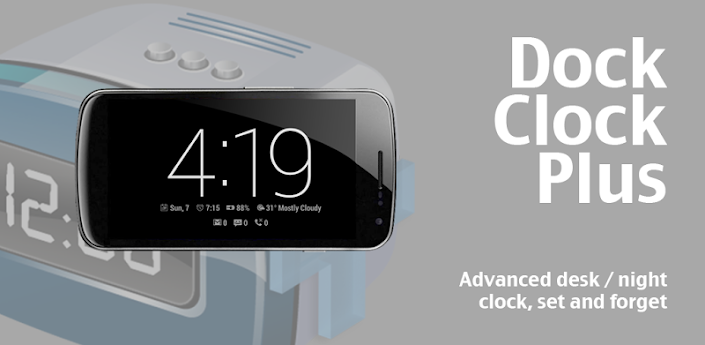
Requirements: 2.2+ Overview: From the developerof the popular free Dock Clock comes the new ultimate version!
Dock Clock Plus is designed as an ‘always on’ clock screen which is activated automaticallywhen you connect your device to a charger (either via dock or power cable). At night Dock Clock transforms into a low-light night clock.
Feedback: Please give us the opportunity to fix any issues by sending feedback: support@gadgetjuice.com
HTC devices: Please note that because of HTC’s broken implementation of the Android API DCP has no way to disable the soft key backlight, they are controlled by the ambient sensor on the device.
Features
- Activated by Dock / Power connected or manually - Appears automatically without unlocking or turning on device (even with security) * - Burn-in protecting orbit on clock page - Silence / low volume settings (no vibrate on change) * - Multi-page design (swipe left / right) * - System wallpaper support (including animated Live Wallpapers) * - Custom activation times and brightness settings (day / night) * - Auto-switching brightness depending on time * - Auto dim of hardware button backlight (except HTC devices – some may work) - Auto-quit in morning (option) * - Keep notification bar visible (option) * - Wave to wake (proximity sensor) (option) * - Customizable text color and sizes * - Digital clock font selection - Analog clock * - Fully customizable clock display (enable / disable any feature) * - Counts display: Unread gmail, Unread text messages, Missed calls * - Alarm time remaining bar (shown only at night) * - Automatic weather location * - Weather page with up to three custom weather locations* - World clock page with up to three custom locations * - Universal phone / tablet design * - More page modules coming soon (CCTV / appointments)
I have a Galaxy S5 Active and cannot use a custom recovery due to a locked bootloader. I have to use Flashfire but every version of the Arm series causes boot loops on the stock rom. :eek:
HTC Desire 516 Stock ROM Flash File Firmware Download
We have shared latest flash file of HTC Desire 516 and free downloading links are available for download from its official server. Flashing of mobiles does at those stage if mobiles are working slow or completely break with the reason of its outdated or corrupted firmware. You can use this firmware for flash mobile. You can use different tools or boxes for flashing. Flashing tools allows you to flash mobiles via USB data cable without flashing boxes. However it is little bit difficult work for you to flash mobiles with tools instead of flashing with boxes. We are always sharing free and official site download links so you can manage it easily.
Before flashing please take a backup of your important data like images, messages and contacts. After flashing you will lose your all of data and your mobile will restored in its original settings. You can restore your backup data to your phone after successful flashing. Now you can download latest flash files of your mobile from below download links. If downloading links are not working or you are unable to download just contact us via commenting we will change or update downloading links. Downloading links HTC Desire 516 Stock Firmware
Getting verified on Twitter with an Android phone is as easy as filling out a form.
Twitter recently opened up its verification procedure to anyone who wants to attempt to convince the company they are worth that coveted blue checkmark.
While its still unclear how Twitter decides how one gets verified — those approved are "accounts of public interest," according to the company — the steps to get there are now much clearer.
How to get verified with your Android phone
Head to Twitters official verification page in your Chrome browser.
Sign in to the Twitter account you want verified (if prompted).
Read the information and tap Continue.
Tap Next after verifying the account in question is the one you want verified.
Enter between two and five websites to help Twitter identify your account.
Enter up to 500 words to tell Twitter why your account should be verified.
Tap Next once you are happy with your entries.
Review your request and press Submit.
Once you submit your request, Twitter will then take some time to deliberate and will contact you over email to deliver the good, or bad, news.
What next?
If for some reason your request for verification is denied, you must wait 30 days to apply again — hopefully with a more convincing argument. Got questions? Leave a comment below!
from Android Central - Android Forums, News, Reviews, Help and Android Wallpapers http://ift.tt/2a37nj5 via IFTTT
Delete Recommendation History in Google Play Music
Google Play Musics desktop site has a new feature that lets you delete history. At the bottom of the settings page, theres a new section called "delete recommendation history". According to Google, this "removes the history used to give you recommendations and customize radio. This will not remove ratings and play counts on individual tracks."
Google shows a long list of recommended radios and albums and you can manually remove them by clicking "not interested" for each radio and album. After using the new "delete recommendation history" feature, I expected to see that all recommendations are removed and Google will start to show new suggested albums and radios based on the songs you play from now on. Unfortunately, thats not the case: Google still shows similar recommendations.
Speaking of historical data, its surprising that Google Play Music still doesnt have a feature that shows all your recently played songs. It should be an auto playlist, just like "last added" and "thumbs up" and users should be able to export it.
Deal Alert Moto G4 on sale for 50 off via Amazon 150 16GB and 180 32GB
The Moto G4 is not the most exciting phone in the world, but its an incredible value. Thats when its not on sale. Right now, you can get the Moto G4 from Amazon for $50, making it almost too good to pass up. Its as cheap as $150 today, and this is the version without lock screen adds.
The Moto G4 usually costs $199.99 for the 16GB version and $229.99 for the 32GB.
Read More
[Deal Alert] Moto G4 on sale for $50 off via Amazon ($150 16GB and $180 32GB) was written by the awesome team at Android Police.
from Android Police – Android News, Apps, Games, Phones, Tablets http://ift.tt/2ahcO3W via IFTTT
HTC One Max Stock ROM Stock Firmware Flash File Download Free
The latest stock ROM of HTC one Max released by its developers and free download links are available for download on different sites. You can use this stock ROM for hard flashing your mobile. After flashing this stock ROM your mobile will restore in its original settings. So you will need to take a backup of your important data like images, contacts & messages. After successful flashing you can restore your backup data to your phone safely. Their are many flashing tools or boxes which you can use as a flasher. It is little bit difficult work for you to flash mobiles with tools instead of flashing with boxes. Now download the latest stock ROM of your phone and put it in one specific folder. Because during flashing you should find it easily. If you have not an enough experience in flashing please dont take a risk of flashing your mobile. If you will flash your phone with corrupted or outdated flash files, your mobile will going to dead.
You can download Stock ROM of HTC one MAX from below download links. If download links are not working or you are facing difficulties during downloading please contact us via commenting, we will update download links very soon. The download links are recently tested and good working. We are always sharing free and official site download links so you can mange it easily. Download links HTC One Max Stock ROM
Micromax A36 Stock ROM Flash File Firmware Free Download
The latest flash files of Micromax A36 has been released and free downloading links are available for download. Flashing of mobile does at those stage if mobile is working slow or completely break with the reason of its outdated or corrupted firmware. You will need to always flash your mobile with latest updated flash files. After flashing your mobile will restore in its original settings. We are sharing free and official site downloading links so you can manage downloading easily. You can any time update your mobile firmware if its new updated are available. During updating your mobile will connect to its official servers and will get new updates if it have been released by its official server. You can use different tools or boxes for flashing. Flashing tools lets you to flash your mobiles with USB data cable without flashing boxes.
Now you can download latest flash files of your mobile from below downloading links. Before flashing please dont forget to take a backup of your important data like images, messages and contacts otherwise you will lose your data. After successful flashing you can restore your your backup data to your phone safely. Now you can get downloading links from below buttons. Downloading links Flash File Download (Google Drive)
Moto Z Force Droid Editions ShatterShield survives drops phone still dies
Its not the fall that killed my Moto Z Force Droid Edition. It was the sudden stop at the end. And even then, it took five of them. ... And the screen still didnt crack.
I now have a zombie Moto Z Force Droid Edition. No, its not the name that killed it. It was the drop test. And while Im normally not a fan of killing a phone just to watch it die, we had good reason this time. Motos ShatterShield.
This is the multiple-layer system that it put in the Droid Turbo 2 — and now in Verizons Moto Z Force — to keep the phones screen from shattering should it be dropped. That doesnt mean its a rugged phone. That doesnt mean you should repeatedly drop it onto concrete. That means should the phone take a spill — like all phones do at some point — the screen should survive.
Yes, theres fine print. (Theres always fine print.) And it reads thusly:
The display and embedded lens are warranted against shattering and cracking for four (4) years from the original date of purchase; scratches or other damage to the protective lens is not covered by this warranty, but should always be in place to prevent scratches and other damage to the underlying components. This phone is not shockproof or designed to withstand all damage from dropping. All other warranty exclusions, including scratches and other cosmetic damage, intentional damage or abuse, normal wear and tear and other limitations apply.
So I wasnt surprised after one-two-three-four-five drops that the screen quit working. ShatterShield isnt meant for the sort of abuse I subjected it to. (The phone still boots, actually. It still works. Its just as if the display became detached.)
But it did not shatter. It looks beat to hell — because it was. But ShatterShield did its job.
Moto Z and Moto Z Force
Our Moto Z review!
Moto Z specs
Moto Mods custom backs
Moto Z and Moto Z Force will be Verizon exclusives until the fall of 2016
The latest Moto Z news
Discuss in our Moto Z forums
Motorola Verizon
from Android Central - Android Forums, News, Reviews, Help and Android Wallpapers http://ift.tt/2af5i6U via IFTTT